

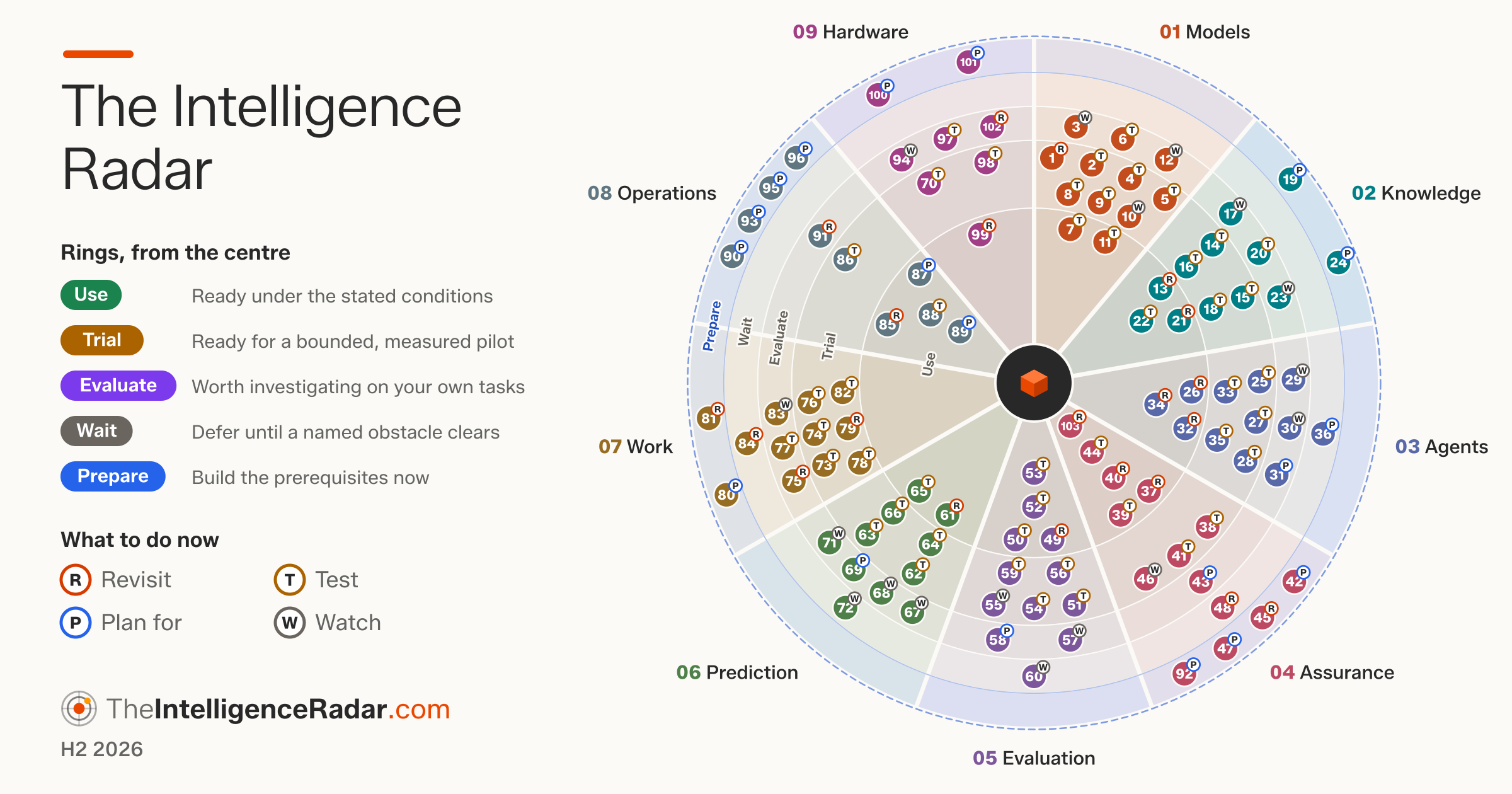
The Intelligence Radar is a community-driven radar for technical leaders. This server brings it into your AI assistant for three things:
| What you can do | Who | |
|---|---|---|
| Read | Search the 108 entries in nine dimensions, read the evidence, check a plan or roadmap against them, read the sector lens and see the interactive radar | Anyone. Runs on your computer, with no network needed |
| Contribute | Send a review of an entry, a correction, evidence, a label change or a new entry, checked against the current edition and shown to you before anything is sent | Anyone, after signing in with GitHub from the conversation |
| Decide | See the contributions waiting for you, read each one beside the entry's current text, and approve, edit, ask for changes or decline, with your reason | Specialist reviewers and editors |
Each entry carries an intelligence label (Use, Trial, Evaluate, Wait, Prepare) and an enterprise label (Revisit, Test, Plan for, Watch).
claude mcp add intelligence-radar -- npx -y @brightbeamai/intelligence-radar-mcpAny other AI tool: command npx, arguments ["-y", "@brightbeamai/intelligence-radar-mcp"] (Node.js 20 or later). Claude Desktop: open the-intelligence-radar.mcpb. Setup for every tool: theintelligenceradar.com/ai-tools.html.
- "Which agent practices can we use now?"
- "Check this roadmap against The Intelligence Radar."
- "Show me the Assurance dimension on the radar."
- "How does The Intelligence Radar read for financial services?"
Tools: search_radar, get_entry, check_plan, get_dimension, get_sector, list_judgements, get_sources and show_radar (the interactive radar, in hosts that support MCP Apps).
- "IR-028 should name the Agentic AI Foundation precisely. Prepare a correction."
- "Here is a new survey on agent adoption. Add it as evidence to IR-025."
- "Propose moving IR-031 to Trial, with these sources."
- "What is the status of my contributions?"
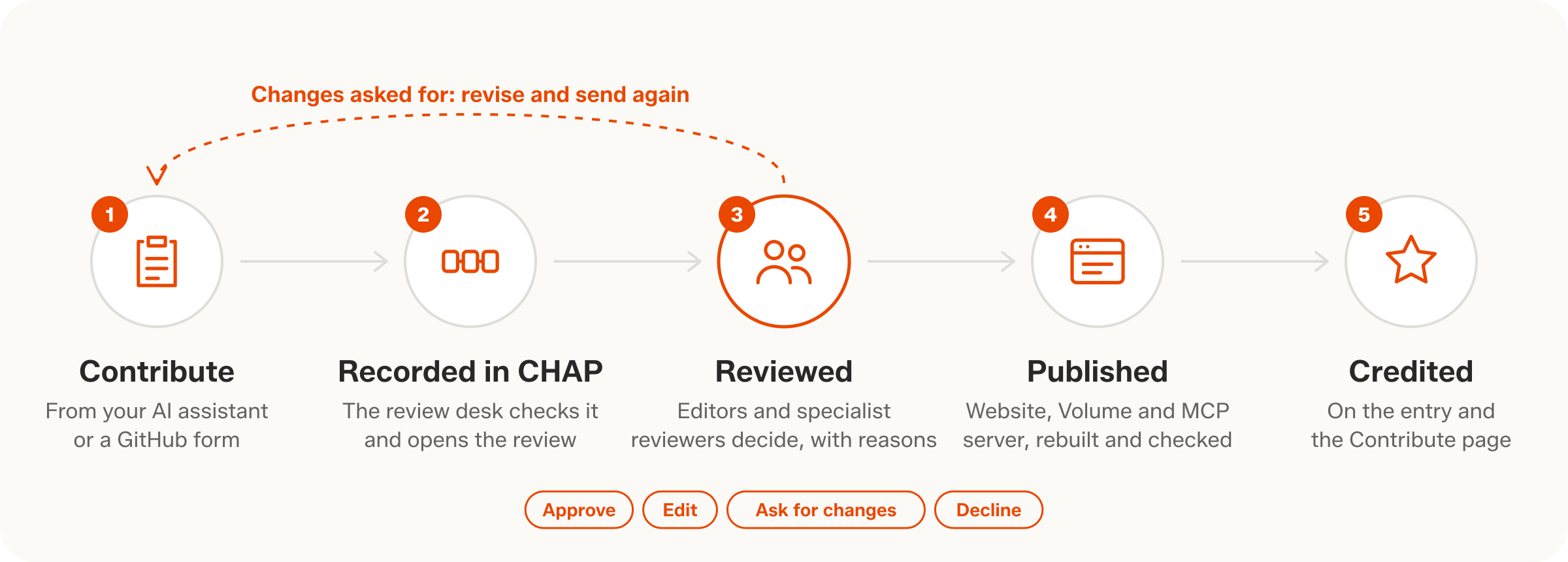
Anyone can contribute. The assistant signs you in with GitHub once (a short code you enter at github.com/login/device, in the browser where you use GitHub), prepares the contribution, shows you exactly what will be sent and submits it only when you agree. It becomes an issue in Intelligence-Radar-Contributions: within a minute, the review desk (an automated check on GitHub) confirms receipt and asks the reviewers, and the editors and specialist reviewers aim to decide within three working days, each decision with its reason. Once a contribution of yours is approved, you join the list of people as a contributor, unless you chose not to be credited. Without signing in, the assistant gives you a pre-filled GitHub form to check and send yourself.
Tools: how_to_contribute, sign_in_with_github, prepare_contribution, submit_contribution, my_contributions, revise_contribution and withdraw_contribution.
- "What is waiting for my review?"
- "Open C-0012 and show me the proposed edits beside the entry."
- "Approve C-0012: the announcement confirms it."
- "Ask for changes on C-0015: name the regulator."
For specialist reviewers and editors on the list of people, who decide on contributions: approve, edit, ask for changes or decline, each with a reason (label changes and new entries also need an editor). Decisions are posted on the issue under your GitHub account, exactly as a command typed on GitHub would be, and recorded in CHAP. To become a specialist reviewer, ask the assistant to apply to be one.
Tools: review_queue, open_contribution, decide_contribution, edit_contribution, publish_queue (editors) and apply_as_reviewer.
Code: MIT. The Intelligence Radar's text and images: CC BY 4.0, credit The Intelligence Radar, Brightbeam.