





Convert PDFs to clean Markdown locally. The CLI works with Claude, Codex, RAG pipelines, and other document-processing workflows.
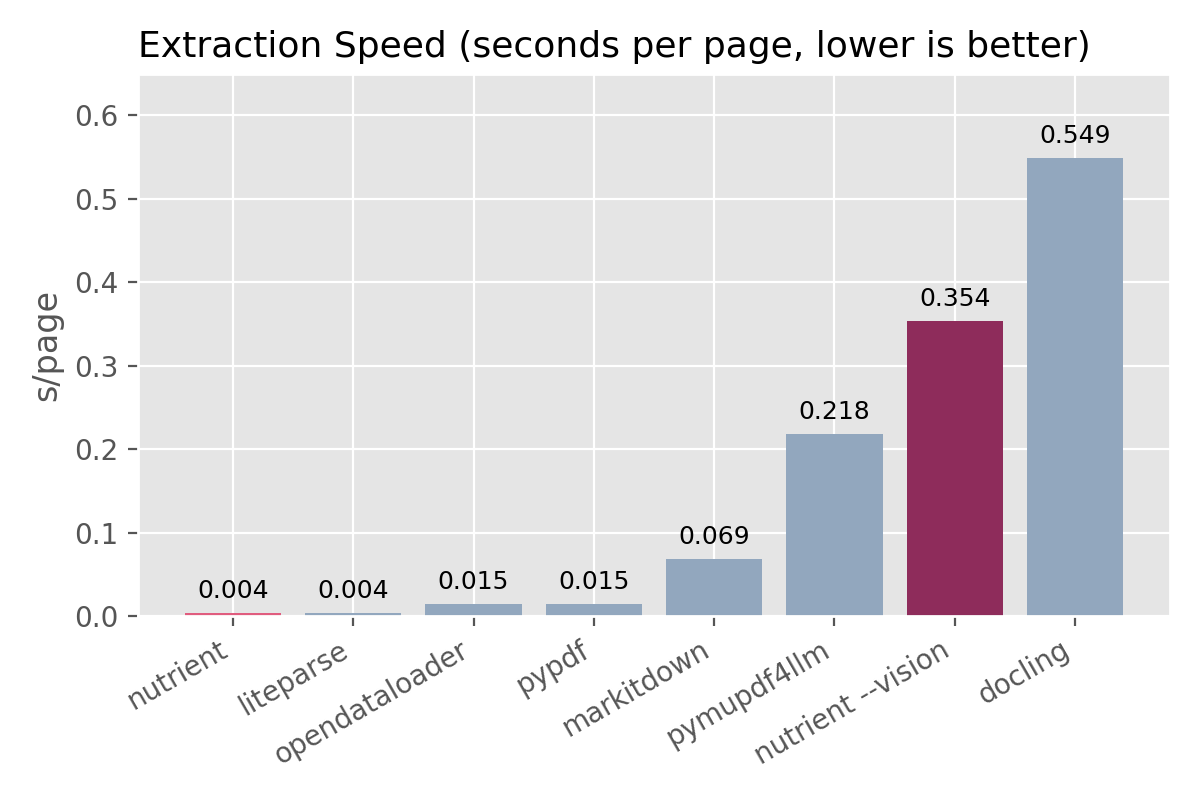
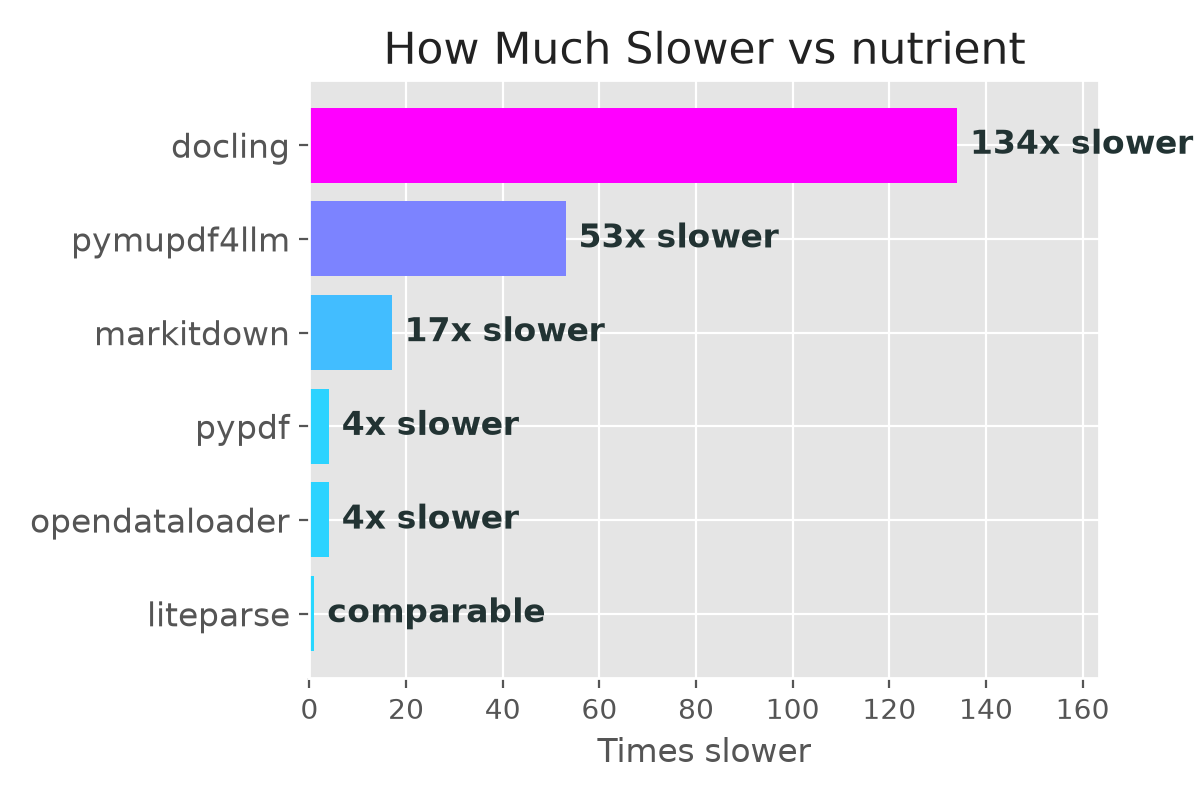
- How fast is it? — 0.004s per page. 134x faster than docling, 53x faster than pymupdf4llm. (benchmarks)
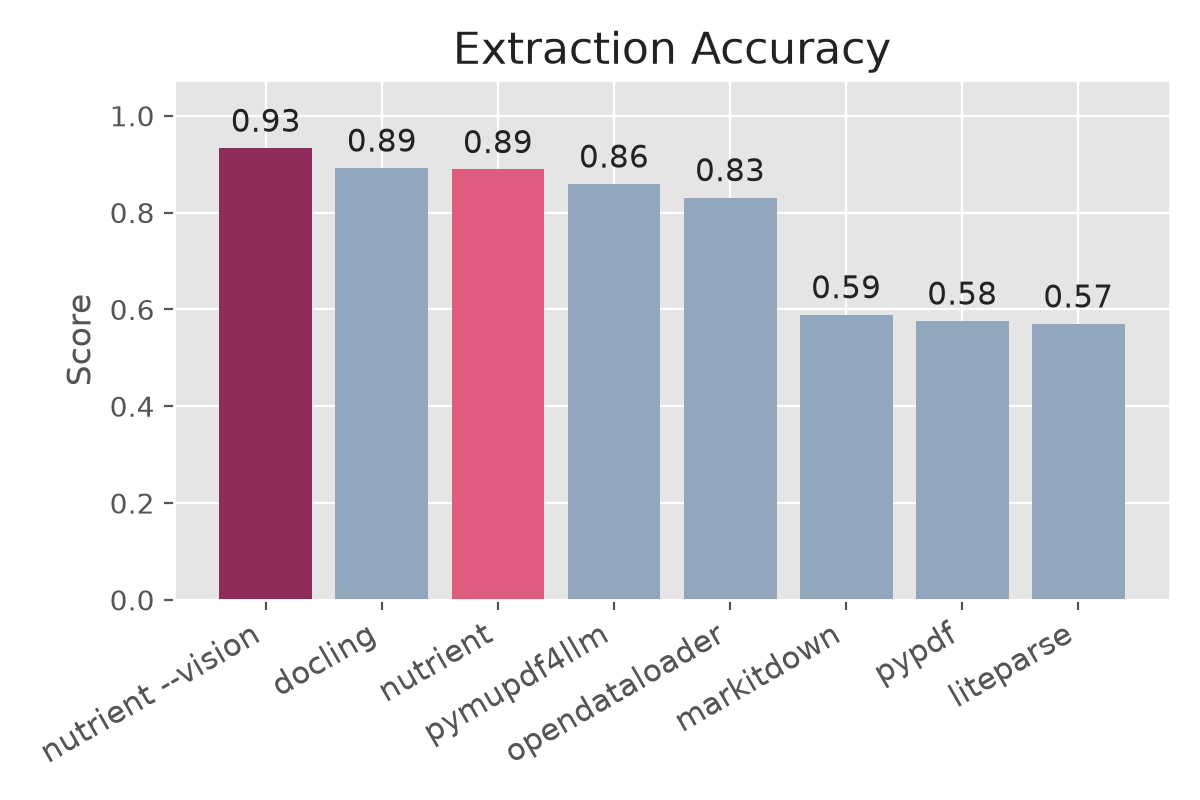
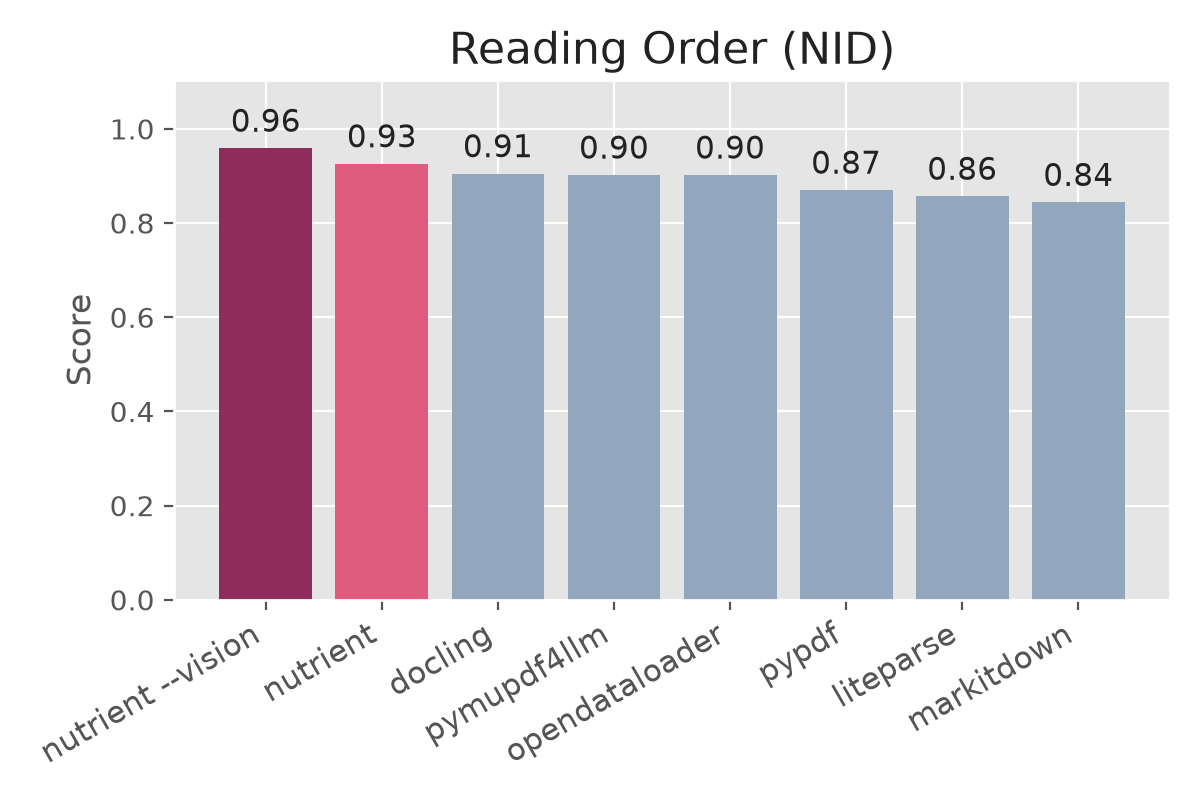
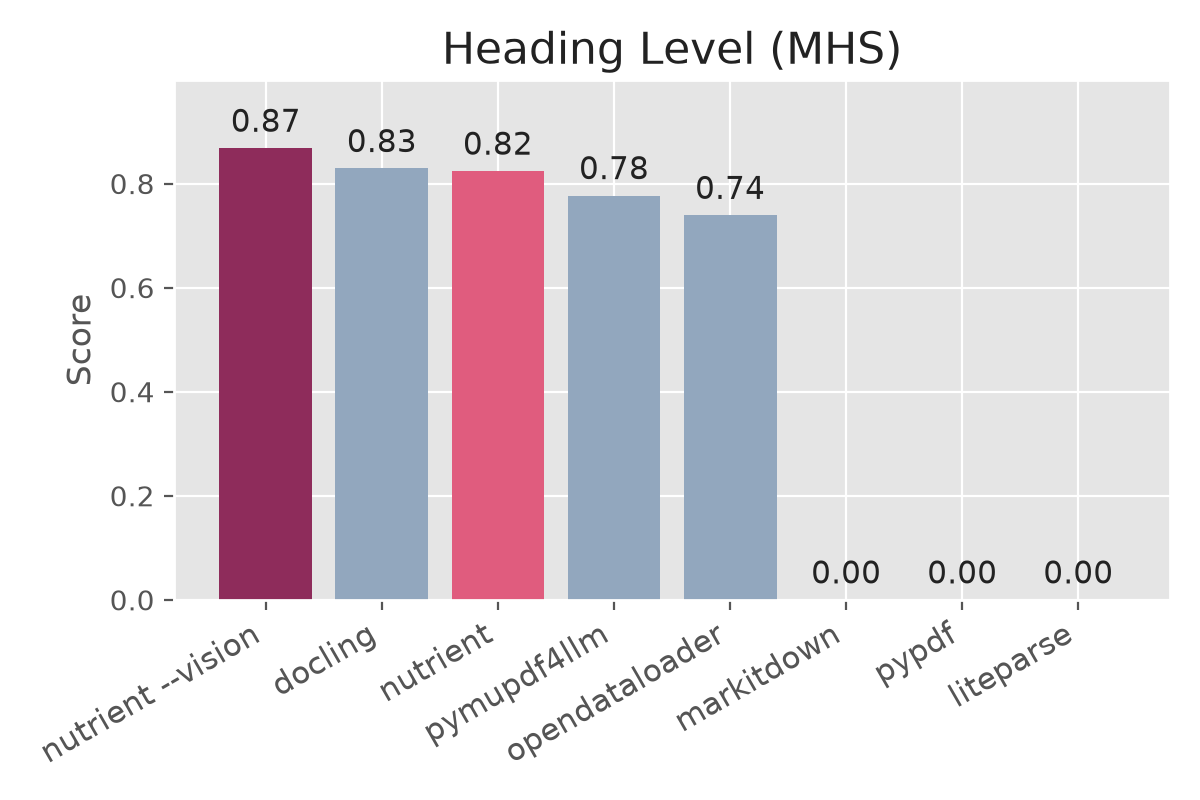
- How accurate is it? — In our benchmark, Nutrient Standard scored 0.93 for reading order, 0.89 overall, and 0.82 for heading detection. (benchmarks)
- Vision (
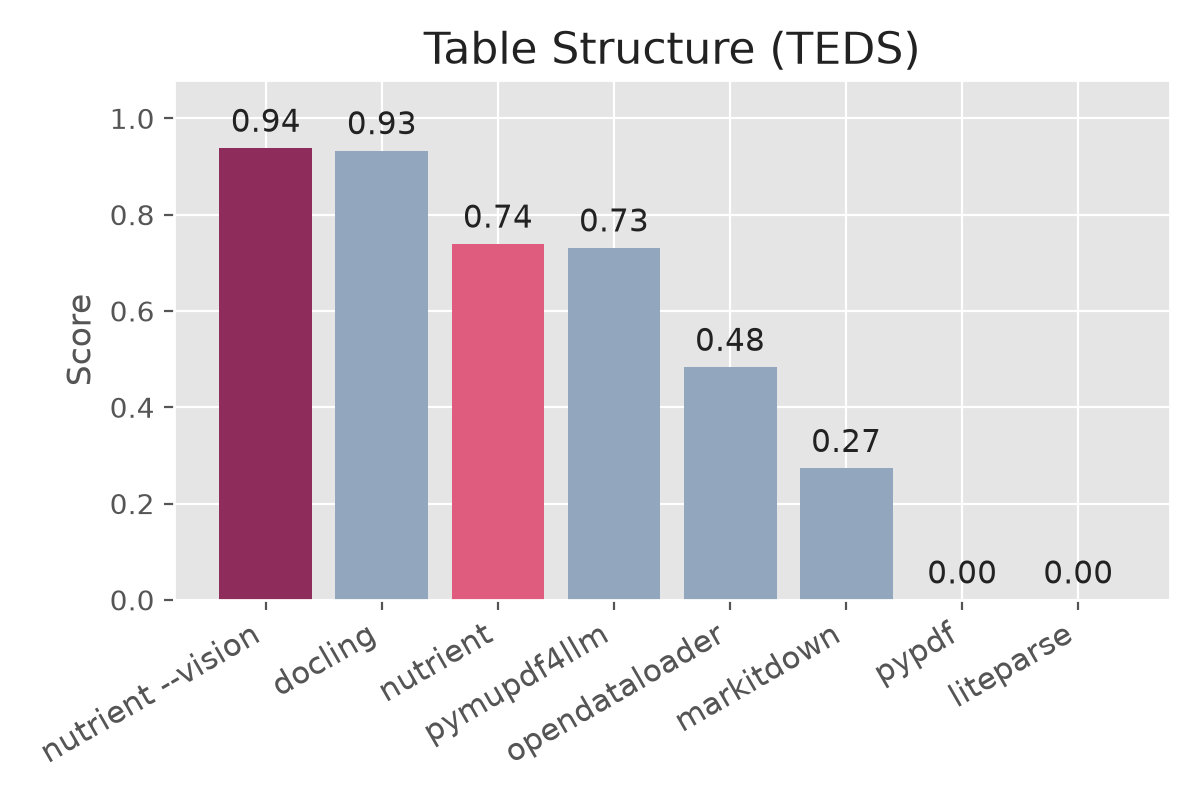
--vision) — Vision handles scanned and handwritten documents and has the highest score in every accuracy measure shown, including tables (0.94 TEDS). It runs locally at 0.35 seconds per page. Use a Nutrient account with Vision access, an API key, or a Nutrient CLI license key. (benchmarks) - Three document tools, one binary —
pdf-to-markdowncreates structured Markdown,pdf-to-textcreates layout-preserving text, andquerysearches an extracted file. (the Nutrient CLI) - Image export —
--enable-image-exportsaves images alongside the Markdown output. (usage) - Where do my PDFs go? — Nowhere. The CLI runs locally. Your documents are not uploaded to Nutrient. (trust & licensing)
- What does it cost? — Standard conversion and
queryare free and unlimited for permitted uses. Account-based Vision uses the allowance from a free or paid plan that includes Vision. Nutrient CLI license keys keep their existing terms. (Standard and Vision)
pdf-to-markdown is one command in the Nutrient CLI, which converts digital PDFs locally. Convert a PDF once, then use the output in your workflow:
| Command | What it does | Use it when |
|---|---|---|
pdf-to-markdown |
Creates Markdown with headings, lists, tables, and reading order | Your workflow benefits from document structure, as most RAG and AI workflows do |
pdf-to-text |
Creates plain text that preserves columns and alignment | Your workflow needs plain text or relies on the page layout |
query |
Searches an extracted file and returns the most relevant line ranges | You need a fact or clause from a large conversion without loading the entire file |
All three install together from this package (and from the Nutrient Skills marketplace), and share one binary in ~/.local/share/nutrient/cli/.
Scanned or photographed documents? Standard works with PDFs that contain a text layer. Vision handles scanned, photographed, handwritten, and other image-only documents locally.
If you use Claude Code, Codex, Pi, Cursor, or Gemini CLI, install the Nutrient Skills plugin — the extraction runs automatically when your agent needs to read a PDF. Add whichever of the three skills you want (they share one binary, so any of them installs it):
npx skills add pspdfkit-labs/nutrient-skills --skill pdf-to-markdown
npx skills add pspdfkit-labs/nutrient-skills --skill pdf-to-text
npx skills add pspdfkit-labs/nutrient-skills --skill query
Or with marketplace/plugin flows (Claude Code, Codex):
/plugin marketplace add pspdfkit-labs/nutrient-skills
/plugin install pdf-to-markdown@nutrient-skills
/plugin install pdf-to-text@nutrient-skills
/plugin install query@nutrient-skills
With Pi:
pi install git:github.com/PSPDFKit-labs/nutrient-skillsOnce installed, just reference a PDF in your prompt — no extra commands needed:
"Extract the pricing table from proposal.pdf"
The skill invokes the CLI transparently and passes the resulting Markdown into your agent context.
For use outside an agent, install the published npm package:
npm install -g @pspdfkit/pdf-to-markdownOr run it without a global install:
npx @pspdfkit/pdf-to-markdown --helpThe package supports Node 18+ on macOS 13 or newer with Apple Silicon, Linux x86_64, Linux arm64, and Windows (x64 and arm64). On Windows the commands run under Git Bash, which ships with Git for Windows and is what agent tools like Claude Code already use for their shell.
On Linux, use a distribution with glibc 2.38 or newer. The CLI also needs libcurl 4, ICU, and OpenSSL 3. For a minimal Ubuntu 24.04 image, install them with apt-get install libcurl4t64 libicu74 ca-certificates.
If you prefer a shell installer, keep the curl fallback:
curl -fsSL https://raw.githubusercontent.com/PSPDFKit/pdf-to-markdown/main/install.sh | shThis installs pdf-to-markdown into ~/.local/bin by default.
You can also install from a clone:
git clone https://github.com/PSPDFKit/pdf-to-markdown.git
cd pdf-to-markdown
./install.sh # or: npm install -g .After install, verify the commands are available:
pdf-to-markdown --help
pdf-to-text --help
query --help
nutrient auth --help
The first argument after nutrient is reserved for CLI subcommands such as
auth and self-update. Use pdf-to-markdown, pdf-to-text, or query
directly for document work.
Standard conversion and query are free and unlimited for permitted uses, including containers, continuous integration (CI), and noncompetitive SaaS integrations. They do not require an account or key, regardless of company size.
Vision requires a Nutrient account with Vision access, an API key for that account, or a Nutrient CLI license key. Account-based Vision uses the allowance from a free or paid plan that includes Vision. Existing Nutrient CLI license keys keep their applicable terms.
To sign in to your Nutrient account:
nutrient auth loginThe CLI opens a Nutrient page in your browser. Approve the request, then return to the terminal.
Check account status and locally pending usage:
nutrient auth statusFor unattended use, obtain an API key in the PDF-to-Markdown dashboard for an account with Vision access, and keep it in the environment. The key uses the account's existing allowance:
export NUTRIENT_API_KEY="pdf_live_..."
pdf-to-markdown --vision input.pdf output.md
Both conversion commands also accept --api-key KEY, but environment variables are safer because command arguments can appear in shell history and process listings.
Keep the key within the organization operating the integration; SaaS users do not need a copy of the operator's key. Standard conversion needs no account, but an explicitly configured key or saved sign-in that cannot be authenticated can cause an error. The CLI does not silently switch to another account. Separately negotiated agreements retain their own terms.
pdf-to-markdown input.pdf output.mdIf output.md is omitted, Markdown is written to stdout.
pdf-to-markdown ./input-pdfs ./output-markdownWhen both arguments are directories, the CLI converts every PDF in the input directory and writes matching Markdown files into the output directory.
pdf-to-markdown --enable-image-export input.pdf output.mdThis saves images from the PDF in output_resources/ and adds standard image links to the Markdown. Use it when the images are useful to the person or AI tool reading the result. It is off by default because image-heavy documents take longer to process.
pdf-to-text input.pdf output.txtProduces layout-preserving plain text: each word is placed on a character grid that mirrors its position on the page, so columns, indentation, and tabular alignment survive the conversion. As with pdf-to-markdown, omit the output path to write to stdout, and pass two directories to batch-convert in parallel:
pdf-to-text input.pdf            # write to stdout
pdf-to-text ./input-pdfs ./output-textBoth commands use the same local binary. Choose based on the output your workflow needs:
- Use
pdf-to-markdownfor headings, lists, tables, and reading order. Most RAG and AI workflows benefit from this structure. - Use
pdf-to-textfor plain text, includinggrep/awkpipelines and workflows that rely on column alignment.
A converted document can be too large for an AI model’s context window. query uses BM25 ranking to return the most relevant line ranges:
query text output.md "what is the total contract value?"Each result includes a Lines A–B range, so you can read that exact part of the extracted file for more context.
The wrapper keeps the downloaded binary current. It checks for a newer release at most once every six hours and updates in place. No manual update is required.
Downloading an update does not by itself establish acceptance of changed license terms. Earlier copies and separately negotiated agreements are addressed in LICENSE.md.
- macOS 13 or newer on Apple Silicon (
Darwin/arm64) - Linux x86_64 (glibc 2.38 or newer)
- Linux arm64 (glibc 2.38 or newer)
- Windows x64
- Windows arm64
macOS Intel and Rosetta shells are unsupported; npm may allow installation, but the commands refuse to run.
Linux also needs the ICU libraries. Most desktop distributions include them, but slim container images often don't. Install them with apt-get install libicu-dev on Debian or Ubuntu, apk add icu-libs on Alpine, or dnf install libicu on Fedora or RHEL.
Windows binaries are Authenticode-signed and run under Git Bash (MINGW/MSYS/Cygwin environments), bundled with Git for Windows. An x64 Git Bash on Windows-on-ARM detects as x86_64 and fetches the x64 binary, which runs fine under Windows emulation.
Nutrient is built for digital-born PDF extraction, so we benchmark it against the open-source parsers you'd otherwise reach for.
Benchmark results from 200 PDF documents with hand-annotated Markdown ground truth, evaluated using NID (reading order), TEDS (table structure), and MHS (heading hierarchy) metrics. All competitor libraries pinned to their latest versions as of 2026-07-06, run on an Apple M3 Ultra (no discrete GPU).
| Solution | Version | Overall | Reading Order (NID) | Table Structure (TEDS) | Heading Level (MHS) |
|---|---|---|---|---|---|
| Nutrient Vision † | 1.3.1 | 0.93 | 0.96 | 0.94 | 0.87 |
| Nutrient Standard | 1.3.0 | 0.89 | 0.93 | 0.74 | 0.82 |
| docling | 2.110.0 | 0.89 | 0.91 | 0.93 | 0.83 |
| pymupdf4llm | 1.28.0 | 0.86 | 0.90 | 0.73 | 0.78 |
| opendataloader | 2.4.7 | 0.83 | 0.90 | 0.48 | 0.74 |
| markitdown | 0.1.6 | 0.59 | 0.84 | 0.27 | 0.00 |
| pypdf | 6.14.2 | 0.58 | 0.87 | 0.00 | 0.00 |
| liteparse | 2.4.1 | 0.57 | 0.86 | 0.00 | 0.00 |
Among the non-Vision results shown, Nutrient Standard has the highest reading-order score. Docling 2.110 has the highest table-structure score and a small overall lead at the third decimal (0.892 vs. 0.889), while taking 134 times longer. Vision has the highest score in every measure and runs faster than Docling. We did not rerun the opendataloader-hybrid variant because it requires a separate Docling service; its last published overall score was 0.87.
| Solution | Seconds per page |
|---|---|
| Nutrient Standard | 0.004 |
| liteparse | 0.004 |
| opendataloader | 0.015 |
| pypdf | 0.015 |
| markitdown | 0.069 |
| pymupdf4llm | 0.218 |
| Nutrient Vision † | 0.354 |
| docling | 0.549 |
Nutrient and LiteParse ran in parallel batches; the other tools processed documents sequentially. Nutrient Standard was the fastest tool in the benchmark that preserved headings and tables. LiteParse matched its speed but did not preserve that structure.
134xfaster thandocling53xfaster thanpymupdf4llm17xfaster thanmarkitdown4xfaster thanpypdf4xfaster thanopendataloader
† The --vision flag improves extraction for scans, handwriting, formulas, and complex layouts. With --provider auto, it uses GPU acceleration when available and otherwise uses the CPU. In this benchmark, Nutrient Vision 1.3.1 has the highest score in every accuracy measure and runs faster than Docling.
The first Vision run downloads several hundred MB of models and caches them locally. Use nutrient auth login, set NUTRIENT_API_KEY for an account with Vision access, or pass a Nutrient CLI license key with --license-key.
For page-based CLI Vision plans, a successfully converted input document consumes one Vision page for each input page. Failed document conversions do not consume Vision pages; successful documents in a partially failed batch remain chargeable. A successful conversion followed by a usage-reporting failure is different from a failed conversion: reconcile the saved usage record before rerunning a completed job. See LICENSE.md and the selected plan for the applicable metering rules.
Standard conversion and query are free and unlimited for permitted uses. They do not use Vision pages and have no revenue or employee threshold. Standard usage reporting is best effort and does not block conversion. Explicitly configured credentials can still produce authentication errors, as described in Accounts and automation.
Vision improves results for scanned pages, handwriting, formulas, and complex tables. Use a Nutrient account with Vision access, an API key for that account, or a Nutrient CLI license key. Review the applicable plan and prices in the DWS dashboard before purchase.
Free account-based Vision access is subject to the plan's allowances and DWS eligibility conditions. Organizations with more than USD 1 million in annual gross revenue or more than 20 employees are ineligible for free premium access, including evaluation, development, and testing. Organizations of any size may purchase authorized premium access.
Account-based offline Vision use remains subject to the plan's allowance and reconnection requirements. Existing Nutrient CLI license keys retain the offline rights provided by their applicable agreements.
For the full comparison table, see docs/benchmarks.md.
- Standard conversion and
queryare free and unlimited for permitted uses, with no account, revenue, or employee restriction - Vision supports account sign-in and API keys for free or paid plans that include Vision, as well as existing Nutrient CLI license keys under their applicable agreements
- Free account-based Vision access is subject to the plan's allowances and the revenue and employee limits above
- PDFs stay local — your documents are not uploaded to Nutrient by this extractor
- DWS usage reports include an event ID, command, mode, input page count, time, CLI version, and an account or installation identifier; SDK diagnostic and analytics reporting is addressed in the license and Privacy Policy
- Hashed installation identifiers may still be personal data; hashing does not establish anonymity. See Nutrient's Privacy Policy and the license's product-specific limits
- Earlier software copies and separately negotiated agreements retain the treatment specified in their applicable terms; they are not silently replaced by an update
- The extraction engine is delivered as a signed platform binary; the repo contains only the wrapper and documentation
- Noncompetitive hosted, SaaS, and internal integrations are permitted. OEM supply of the engine in customer-operated products requires a separate agreement. Branding a hosted SaaS application under your own name does not itself make it OEM use
See LICENSE.md for the full terms.
In our benchmark, Nutrient Standard processed a page in 0.004 seconds and had the highest reading-order score among the non-Vision results. It also preserved headings and tables.
Standard works with PDFs that already contain a text layer; it does not perform OCR. Vision handles scanned, photographed, and handwritten documents locally. See Vision.
The local extractor does not upload your documents or converted output to Nutrient. DWS usage reports exclude file names, paths, document contents, and output. Account, installation, diagnostic, and analytics data are addressed in the license and Privacy Policy. If you submit files to a hosted DWS evaluation or feed extracted Markdown into Claude, Codex, or another provider, that separate service's data terms apply.
Standard conversion and query require neither. For Vision, sign in to an account with Vision access, use an API key for that account, or supply a Nutrient CLI license key. Account sign-in and API keys use the same account allowance.
Yes, for noncompetitive uses under LICENSE.md. You may operate the CLI on infrastructure you control and provide functionality to your users. Standard and query remain free and unlimited; your account or CLI license must authorize Vision. Supplying the proprietary engine as part of a customer-operated product is OEM use and requires a separate agreement.
The wrapper, installer, and documentation are public. The extraction engine is proprietary and ships as a signed platform binary.