SelfPrivacy — is a platform on your cloud hosting, that allows to deploy your own private services and control them using mobile application.
To use this application, you'll be required to create accounts of different service providers. Please reffer to this manual: https://selfprivacy.org/docs/getting-started/
Application will do the following things for you:
- Create your personal server
- Setup NixOS
- Bring all services to the ready-to-use state. Services include:
- E-mail, ready to use with DeltaChat
- NextCloud - your personal cloud storage
- Bitwarden — secure and private password manager
- Pleroma — your private fediverse space for blogging
- Jitsi — awesome Zoom alternative
- Gitea — your own Git server
- OpenConnect — Personal VPN server
Project is currently in open beta state. Feel free to try it. It would be much appreciated if you would provide us with some feedback.
Supported platforms are Android, Linux, and Windows. We are looking forward to support iOS and macOS builds.
For Linux builds, make sure you have these packages installed:
| Arch-based | Debian-based |
|---|---|
| pacman -S ninja xdg-user-dirs gnome-keyring unzip xz-utils zip | apt install ninja-build xdg-user-dirs gnome-keyring unzip xz-utils zip |
Install Flutter and Android SDK tools, then try your setup:
flutter pub get

# Build .APK for Android
flutter build apk --flavor production
# Build nightly .APK for Android
flutter build apk --flavor nightly
# Build AAB bundle for Google Play
flutter build aab --flavor production
# Build Linux binaries
flutter build linux
# Build Windows binaries
flutter build windows

# Package AppImage
appimage-builder --recipe appimage.yml
# Package Flatpak
flatpak-builder --force-clean --repo=flatpak-repo flatpak-build flatpak.yml
flatpak build-bundle flatpak-repo org.selfprivacy.app.flatpak org.selfprivacy.app
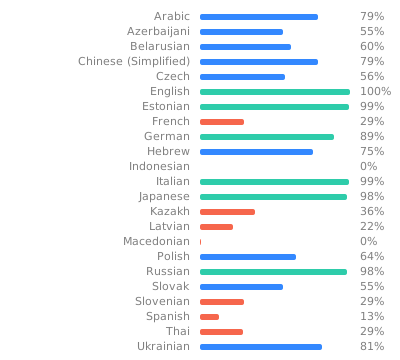


Translations are stored in assets/translations/*.json and can be edited on https://weblate.selfprivacy.org/projects/selfprivacy/selfprivacy-app/.
Run these commands from the repository root. Nix provides the pinned Flutter SDK.
nix run .#test-flutter                  # full suite, including goldens, with coverage
nix develop -i .#test -c flutter test test/path/to/example_test.dart
The full suite writes tests.output and coverage/lcov.info. CI preserves these reports and any golden difference images in the flutter-test-results artifact.
Provider smoke tests replay recorded responses by default. To record fresh responses from the read-only provider checks:
nix run .#record-vcr -- test/integration/vcr/provider_api_smoke_test.dartThe command uses credentials from the environment or prompts without terminal echo. Leave a prompt empty to skip that provider. Supported variables:
HETZNER_API_TOKEN,DIGITAL_OCEAN_API_TOKEN,CLOUDFLARE_API_TOKEN,DESEC_API_TOKENPORKBUN_API_KEYandPORKBUN_SECRET_API_KEYBACKBLAZE_APPLICATION_KEY_IDandBACKBLAZE_APPLICATION_KEY
Do not put credentials in command arguments or plaintext files. Review cassette diffs for credentials and private keys before committing. The recording command sets VCR_MODE=record; direct Flutter runs also accept replay, auto and bypass.
Widgetbook is an interactive catalog of the app's widgets.
nix run .#widgetbook                             # open the catalog
nix run .#generate-widgetbook                    # regenerate after editing use cases
nix run .#test-widgetbook                        # compare goldens and run catalog checks
nix run .#test-widgetbook -- --update-goldens    # generate baselines for review
nix build .#widgetbook                           # build the standalone Linux catalog
Add meaningful use cases with every new public component. Keep one component per file under tool/widgetbook/use_cases, mirroring the production folders, and use @UseCase annotations with shared fixtures. Regenerate the directory file rather than editing it. The default PreviewHost.content captures natural height; use PreviewHost.screen for full-screen layouts instead of adjusting card heights.
Each named example has English light/dark PNGs in test/widgetbook/goldens.
Linux and UTC are the reference environment.
After updating baselines, inspect text, icons, assets and layout, then rerun comparisons.
Hard shadows are expected test artifacts. With FVM, use TZ=UTC fvm flutter test test/widgetbook.