
Track what you actually ship with AI.
Vibetime wraps Claude Code, Codex, and Gemini and prints a session summary every time you're done. No config, no daemon, no account by default.
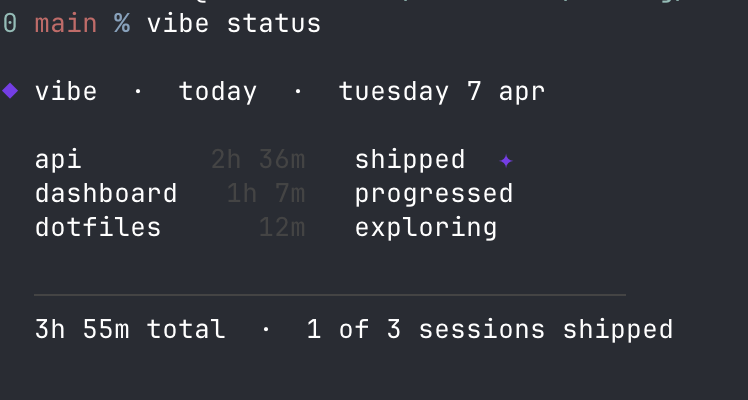
npm install -g vibetime-cli
vibe init
source ~/.zshrc   # or ~/.bashrc — or restart your terminal
Adds shell hooks that wrap claude, codex, and gemini. The tools work exactly the same — Vibetime tracks your git state while you code and prints the endcard when you're done.
Fish shell — vibe init writes bash/zsh syntax. Fish users should add hooks manually to ~/.config/fish/config.fish:
function claude; vibe __wrap claude $argv; endEvery time you close a Claude Code, Codex, or Gemini session:
╭─────────────────────────────────────────────╮
│  ◆ vibe  ·  api  ·  2h 14m                  │
├─────────────────────────────────────────────┤
│                                             │
│  3 commits  ·  +847 −231  ·  12 files       │
│                                             │
│  ████████░░  shipped  ✦                     │
│                                             │
╰─────────────────────────────────────────────╯
Every shipped session counts on the leaderboard.
Sessions are scored by what happened in git:
| tier | bar | meaning |
|---|---|---|
| shipped | ████████░░ |
commits + meaningful changes |
| progressed | ██████░░░░ |
commits, small changes |
| tinkering | ████░░░░░░ |
changes but no commits |
| exploring | ██░░░░░░░░ |
a few lines touched |
| idle | ░░░░░░░░░░ |
nothing changed |
| interrupted | ░░░░░░░░░░ |
session killed or crashed |
How duration works — Vibetime polls your git state every 30 seconds. If no file changes, commits, or staging activity are detected for 30 minutes, the idle time is excluded from your session duration. Laptop sleep and background idle are automatically handled. Non-git projects use wall-clock time.
vibe init wraps the claude terminal command. The Claude Code Desktop app never runs that command, so the shell wrapper can't see it. Track Desktop sessions with hooks instead:
vibe hooks install
This registers session hooks in ~/.claude/settings.json — the same settings the Desktop app reads. From then on, every Desktop session is recorded and shows up in vibe status, vibe log, vibe share, and the leaderboard, exactly like a terminal session.
Nothing else to run: Claude Code hot-reloads the settings, so just open a new Desktop session. Duration is measured the same way as the terminal — active coding time, with idle gaps over 30 minutes excluded.
Working across several repos? Start the session wherever you like. If that directory isn't a repo itself, vibetime picks up the repos sitting directly inside it and measures all of them, so a session that touches api/ and web/ is scored on both. A directory with no repos in or under it isn't tracked — there'd be nothing to measure.
If you use both the terminal wrapper and Desktop hooks, terminal claude sessions are counted once, not twice — the hooks stand down when the shell wrapper is already tracking.
Why hooks use absolute paths — the Desktop app, when launched from the Dock, doesn't inherit your shell
PATH, so a barevibewouldn't resolve.vibe hooks installpins the absolute path to Node and the CLI so tracking works regardless of how Desktop is launched.If you switch Node versions (e.g. an
nvmupgrade) and remove the old one, re-runvibe hooks installso the pinned path points at your current Node.
Stop tracking Desktop at any time:
vibe hooks uninstall
Live at vibetime.club/leaderboard. Public web view, no CLI required to browse.
vibe login        sign in with github
vibe leaderboard  view the leaderboard from your terminal
vibe logout       sign out and stop submitting
The leaderboard ranks users by shipped sessions in the last rolling 7 days. Tabs on the web view switch to last 30 days or all time.
Sign-in uses the GitHub device flow: no browser callback, just a short code you paste on github.com. Until you run vibe login, no network requests are made.
Once logged in, the endcard renders as usual and the session submits in the background. If you're offline the submit retries at the end of the next session, so anything you ship will eventually appear.
Submitted fields: tool, startedAt, endedAt, durationSeconds, commits, linesAdded, linesRemoved, filesTouched, momentum, and a SHA-256 hash of the project name. Branch names, raw repo names, exit codes, and your local handle never leave the machine.
vibe logout removes ~/.vibe/auth.json and submission stops immediately.
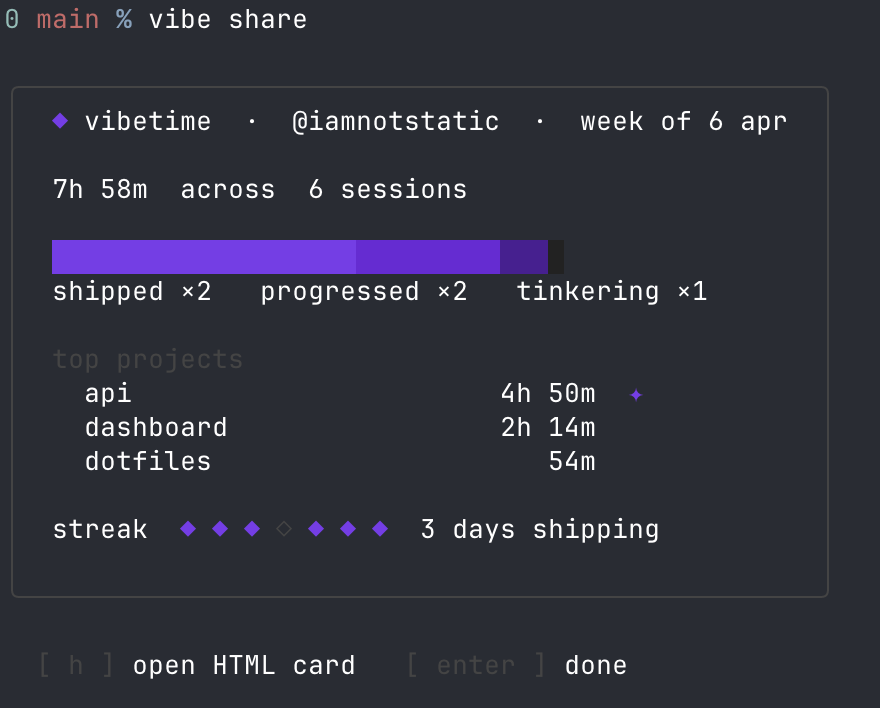
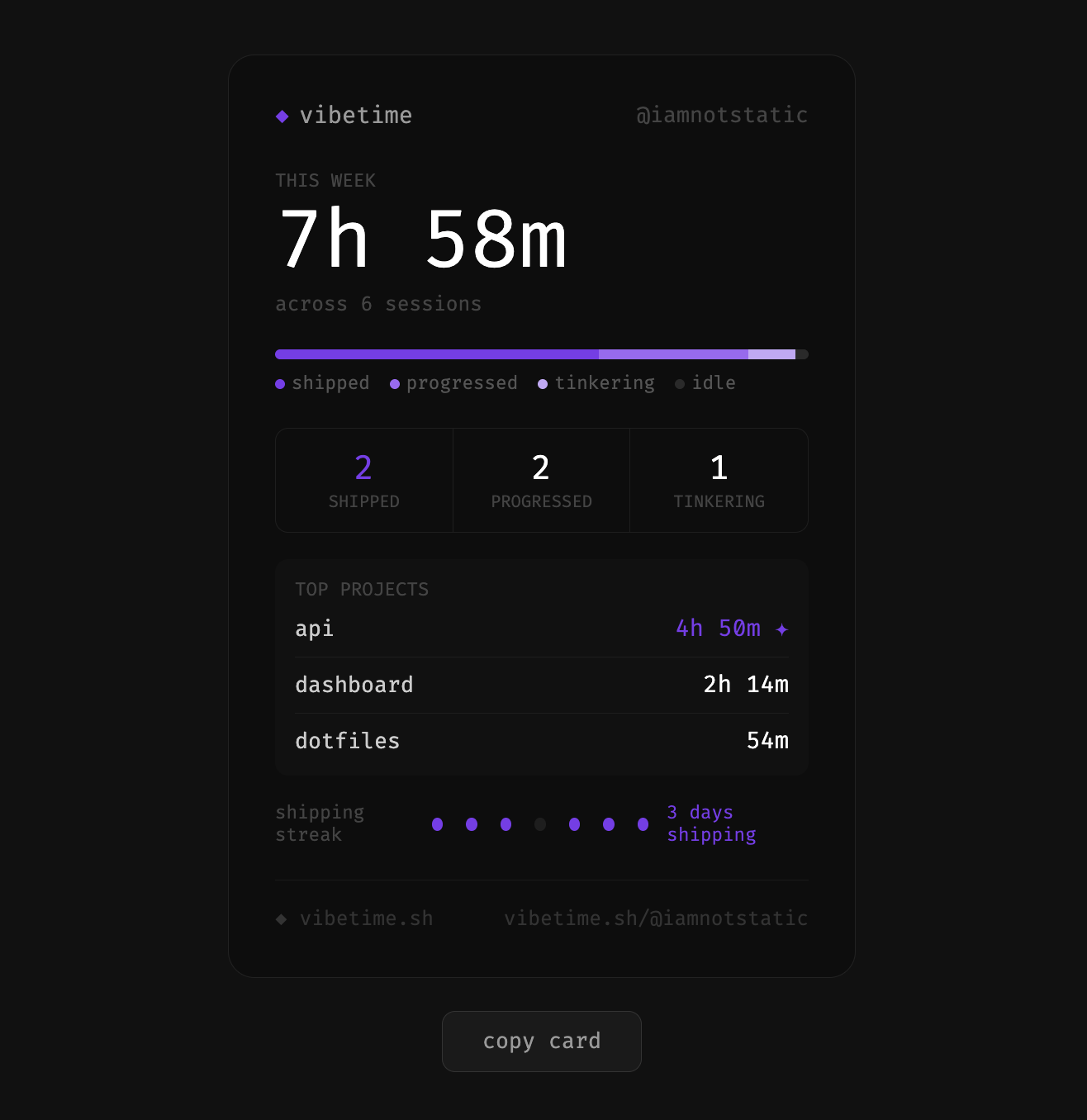
Run vibe share to print your weekly card. Press h to open the HTML version — copy it, screenshot it, post it.
Streaks track consecutive days you shipped. If you shipped yesterday but not yet today, your streak shows ⏳ — you still have time.
Vibetime wraps any AI CLI. To track a tool not listed above:
vibe config add-tool aider
vibe status                  today's sessions (includes active sessions)
vibe log                     last 20 sessions
vibe share                   weekly summary card
vibe share --html            shareable HTML card
vibe login                   sign in to the leaderboard via github
vibe logout                  sign out of the leaderboard
vibe leaderboard             shipped sessions, last 7 days
vibe config show             current settings
vibe config set handle <name> set your @handle (shown on share cards)
vibe config add-tool <name>  track a new AI CLI tool
vibe hooks install           track Claude Code Desktop sessions
vibe hooks uninstall         stop tracking Claude Code Desktop
vibe uninstall               remove shell hooks
Sessions belong to the day they started — a session that runs past midnight appears under the previous day.
vibe uninstall
vibe hooks uninstall   # if you tracked Claude Code Desktop
npm uninstall -g vibetime-cli
vibe uninstall removes all shell hooks from your rc file, and vibe hooks uninstall removes the Claude Code Desktop hooks from ~/.claude/settings.json. Your session data in ~/.vibe/ is preserved — delete it manually if you want a clean removal.
Vibetime has no telemetry and no account by default. Everything stays on your machine unless you opt in to the leaderboard with vibe login.
It reads git metadata only — commit counts, line counts, file counts. It never reads file contents, environment variables, API keys, or anything you type into the wrapped tool. The AI CLI's stdin/stdout are passed straight through via spawn with stdio: 'inherit'.
The Claude Code Desktop hooks are held to the same standard: they read only the session id and working directory from the hook payload — never the transcript, your prompts, or the model's output — and derive the same git metadata from there.
All data is stored locally in ~/.vibe/. If you've signed in to the leaderboard, see the section above for the exact fields submitted.