

Your world waits. Your server doesn’t.
Effortless, wake-on-connect Minecraft hosting for friend groups.
Sleeps when empty, wakes when you join, snapshots safely in between.


-b45126?style=for-the-badge&logo=rust&logoColor=white)


Website & Panel • Why Kurbis? • How It Works • Features • Web Panel • Specs & Limits • Quick Start • FAQ
Playing Minecraft with friends usually comes with an annoying compromise:
- Pay $10–$25 every month for a 24/7 rented VPS that sits completely empty 90% of the week.
- Self-host on your gaming PC, which means port forwarding, dynamic DNS headaches, leaving your computer running all night, and being the only person who can turn the server on.
- Use traditional "free" hosts, only to suffer through 45-minute queue times, laggy hardware, hourly renewal CAPTCHAs, and servers that get deleted if you go on vacation for a week.
Kurbis keeps your world ready without keeping a machine burning electricity.
When anyone in your group wants to play, they simply connect to your server address in Minecraft. The Kurbis gateway catches the connection, wakes your world up in seconds, and connects them seamlessly. When everyone logs off, a 5-minute countdown begins. Once it finishes, Kurbis captures a verified snapshot of your world, stores it safely in durable cloud storage, and releases the infrastructure.
Next day, next week, or next month—connect again, and your world picks up right where you left off.
- ⚡ Zero server babysitting — No need to open a dashboard to click "Start" before playing.
- 🎮 One address, two editions — Java and Bedrock friends play together in the exact same world.
- 🛡️ Durable snapshot protection — Your world data is saved safely to cloud object storage.
- 💸 100% Free — 2 GiB RAM, 5 GiB storage, no credit card required, no ads, no countdown renewals.
Kurbis reimagines the server lifecycle as a clean, automated cycle:
┌──────────────────────────────────────────────────────────────────────────┐
│                         THE KURBIS SERVER CYCLE                          │
└──────────────────────────────────────────────────────────────────────────┘

    1. 💤 SLEEP                          2. ⚡ WAKE ON CONNECT
    ────────────────────────             ────────────────────────
    • World rests in cloud storage       • Any player joins in Minecraft
    • 0 CPU, 0 RAM consumed              • Gateway catches connection
    • Domain & IP stay reserved          • Server starts & restores world
               │                                    ▲
               ▼                                    │
    ┌────────────────────────┐           ┌────────────────────────┐
    │     Durable Cloud      │           │     Kurbis Gateway     │
    │     World Snapshot     │           │    (Java + Bedrock)    │
    └────────────────────────┘           └────────────────────────┘
               ▲                                    │
               │                                    ▼
    4. 💾 SNAPSHOT & SLEEP               3. ⛏️ PLAY TOGETHER
    ────────────────────────             ────────────────────────
    • Last player disconnects            • Friends build, mine & explore
    • 5-minute idle countdown runs       • High tick rate, 2 GiB RAM
    • Safe world snapshot captured       • Live logs, web console & OP
- Sleep: When no one is playing, no server process runs. Your world lives securely as an immutable, compressed snapshot in cloud storage.
- Wake on Connect: A player opens Minecraft and connects to
your-world.kurbis.host. The Kurbis intelligent gateway catches the connection, provisions an isolated worker, restores your world from its snapshot, and seamlessly transitions the player into the game. - Play: Friends join, explore, build, and adventure together. Low latency, rock-solid tick rates, and full crossplay.
- Snapshot: When the last person logs off, a 5-minute inactivity timer begins. Once it expires, Kurbis cleanly saves the world state, verifies the snapshot in cloud storage, and releases worker capacity.
Stop asking your friends "Are you on PC or console?"
- Single Hostname: Share one clean address (e.g.
your-world.kurbis.host). - Seamless Crossplay: Java Edition players (PC, Mac, Linux) and Bedrock Edition players (Windows, iOS, Android, Xbox, PlayStation, Nintendo Switch) play together in the exact same world.
- Zero Config: No messy Geyser setups, no separate port forwards, no plugin conflicts.
Kurbis is powered by Pumpkin, a cutting-edge Minecraft server written from the ground up in Rust:
- Instant Boot: Boots in a fraction of the time required by traditional bloated Java servers.
- Memory Efficient: High-performance multithreading and memory safety without garbage-collection pauses.
- Buttery-Smooth Ticks: Reliable 20 TPS performance designed for multiplayer exploration.
Your builds and adventures are too important to lose to server corruption:
- Automatic Session Saves: An immutable snapshot is captured every time your server goes to sleep.
- Manual Backups: Trigger a manual backup snapshot anytime from the web panel while playing.
- 1-Click Restore: Creeper blew up your storage room? Accidental lava fire? Roll back to any snapshot in your history instantly.
- Persistent Worlds: Your world never expires or gets wiped due to inactivity.
Manage your server without ever leaving the game:
- Are you an operator in-game? Type
/kurbisin chat. - Kurbis generates a private, secure, 15-minute one-time link right in your Minecraft chat.
- Click the link to open your server's web management panel—no passwords or logins required!
A management dashboard designed for players, not system administrators:
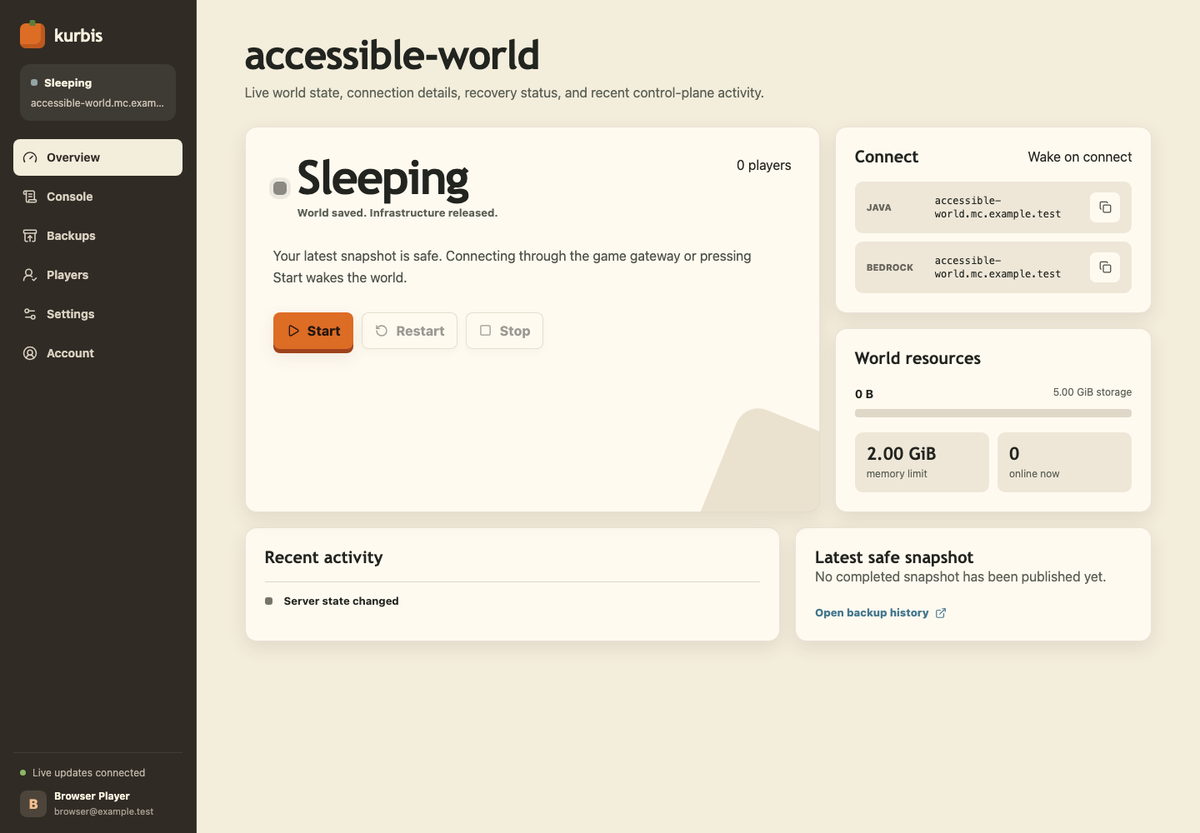
- Live Lifecycle State: Real-time visibility into whether your world is Sleeping, Waking, Restoring, Online, or Snapshotting.
- Online Console: Send operator commands (
/gamemode,/time set,/give) directly from your browser while online. - Live ANSI Logs: Real-time server logs with Minecraft and ANSI color rendering.
- Player & Whitelist Management: Manage your player roster, whitelist status, and operator permissions with a single click.
- World Presets & Settings: Choose between Survival or Creative presets, tweak difficulty, toggle PvP, and configure view distance.
- Accessible & Responsive: Fully responsive from 390px mobile screens to large desktop monitors, keyboard navigable, and WCAG AA compliant.
We believe hosting limits should be plainly stated with no hidden asterisks:
| Specification | Kurbis Free Tier | Details |
|---|---|---|
| Dedicated Memory | 2 GiB RAM | Dedicated worker memory per world |
| World Storage | 5 GiB | Persistent S3-compatible cloud snapshot storage |
| Idle Sleep Timer | 5 Minutes | Automatically saves and sleeps after the last player leaves |
| Editions | Java + Bedrock | Both editions supported out of the box |
| Server Address | Custom Subdomain | Included free (e.g. your-world.kurbis.host) |
| Player Limit | Uncapped | No artificial player slots; invite your whole group |
| Snapshots | Unlimited Saves | Automatic session saves + manual backup snapshots |
| Console & Logs | Live SSE Stream | Real-time web console and color-formatted logs |
| Price | 100% Free | No credit card required. No ads. No deletion timers. |
Getting a server up and running takes less than a minute:
- Sign In: Go to kurbis.host and sign in with your Google or Discord account.
- Create Your World: Pick a name for your world (e.g.
cozy-craft) and select your game preset (Survival or Creative). - Share the Address: Copy your server address (
cozy-craft.kurbis.host) and share it with your friends. - Join & Play: Open Minecraft (Java or Bedrock) and connect to your address. Kurbis automatically wakes up, restores the world, and lets you in!
Does sleeping delete my world, chests, or inventory?
No, never. When a server sleeps, Kurbis performs a clean save and uploads a full snapshot of your world directory to durable cloud storage. Your buildings, chests, entities, player inventories, and advancements are fully preserved. When the next player connects, that exact snapshot is restored.
Do I or my friends have to open a website before playing?
No! That’s the magic of wake-on-connect. Anyone who has your server address can simply add it to their Minecraft server list and click "Join". The Kurbis gateway catches the incoming handshake, wakes up your server, and connects the player automatically.
Can my friends wake up the server when I'm not online?
Yes. You don't need to be at your computer or awake to start the server for your friends. As long as they have the address (and are on your whitelist, if you have one enabled), connecting to the server will trigger the wake cycle.
Can Java and Bedrock players play in the same world together?
Yes. Kurbis has built-in cross-edition networking. A player on a Windows PC running Java Edition and a player on an iPad or console running Bedrock Edition connect to the exact same hostname and see each other in the game.
What happens if someone stays AFK?
The 5-minute inactivity countdown only begins when the online player count drops to zero. As long as at least one player is actively connected to the server, it will stay online.
Can I create manual backups or roll back my world?
Yes. From the Kurbis web panel at [kurbis.host/app](https://kurbis.host/app), you can trigger manual backups while your server is online, inspect your snapshot history, and restore any previous snapshot with a single click.
Can I upload custom mods or Forge/Fabric modpacks right now?
Not in v1. To guarantee sub-second boot times, rock-solid stability, and flawless crossplay, Kurbis currently focuses on curated, high-performance vanilla gameplay powered by Pumpkin. Mod and plugin support is on our roadmap as the Pumpkin ecosystem expands.
How can Kurbis offer this for free without ads?
Traditional hosts pay massive data center bills because their servers run 24 hours a day, 7 days a week—even when 95% of those hours are spent hosting an empty world. By putting inactive servers to sleep and restoring them on demand, Kurbis cuts idle compute waste by over 90%, making high-performance free hosting sustainable.
Kurbis is engineered with modern, memory-safe, high-performance systems:
- Control Plane: Written in Rust using Axum, PostgreSQL, and Server-Sent Events (SSE).
- Smart Gateway: Custom Rust network proxy handling Java hostname routing, Bedrock transport, and waiting-session orchestration.
- Server Engine: Pumpkin — the fast, multithreaded Minecraft server built from scratch in Rust.
- Worker Infrastructure: Lightweight, isolated container workers with local NVMe caching and S3-compatible snapshot pipelines.
- Web Interface: Modern Next.js (App Router), Tailwind CSS, accessible UI primitives, and real-time SSE event subscriptions.
- 🌍 Website & Panel: kurbis.host
- 💻 Control Panel: kurbis.host/app
- 🎃 Pumpkin Minecraft Engine: github.com/kurbis-host/Pumpkin
- 🏢 GitHub Organization: github.com/kurbis-host
Kurbis v1 · Pumpkin-powered Minecraft hosting · Start your world at kurbis.host
