
Build Real-Time Meeting Intelligence with Zoom RTMS


Arlo is an open-source reference implementation that demonstrates the power of Zoom's RTMS (Real-Time Media Streams) APIs. It shows developers how to build meeting assistants that capture live transcripts without requiring a bot in the meeting.
|
|
Note: This is a starting point for developers. The industry verticals are illustrative examples showing what's possible with RTMS.

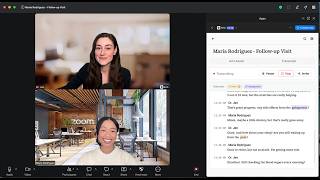
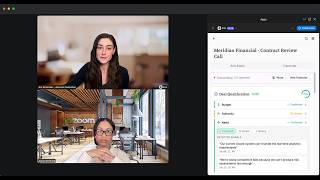
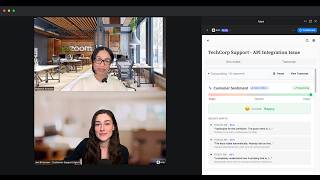
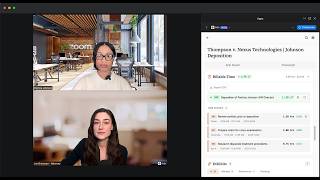
Choose your workflow — each vertical is tailored to your industry
| Healthcare | Sales | Support |
|---|---|---|
 |
 |
 |
| Watch Demo | Watch Demo | Watch Demo |
| Legal | Notes |
|---|---|
 |
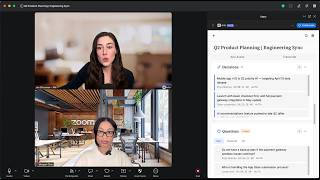 |
| Watch Demo | Watch Demo |
| Feature | Description |
|---|---|
| Live Transcription | Real-time captions via RTMS (< 1 second latency) |
| Voice Commands | Say "Arlo, summarize" or "Arlo, action items" during meetings |
| AI Insights | Summaries, action items, and next steps powered by OpenRouter |
| Full-Text Search | Search across all your meeting transcripts instantly |
| Chat with Transcripts | Ask questions about your meetings using AI |
| Meeting Highlights | Create bookmarks with timestamps for key moments |
| Export Options | Download WebVTT files or Markdown summaries |
| Dark Mode | Automatic OS detection with manual toggle |
| Filler Word Coach | Real-time detection of filler words with audio alerts (Sales vertical) |
| Show AI Prompts | Developer tool to inspect the AI prompts powering each feature |
| Industry Verticals | Specialized modes: Arlo for Notes, Healthcare, Legal, Sales, and Support |
AI features work out of the box — no API key required! Arlo uses OpenRouter with free models (Gemini, Llama). Optional: add your own
OPENROUTER_API_KEYfor higher rate limits.
Control Arlo hands-free during meetings. Just say the wake word followed by a command:
| Command | What It Does |
|---|---|
| "Arlo, summarize" | Generate a meeting summary |
| "Arlo, action items" | Extract action items and to-dos |
| "Arlo, highlight this" | Create a bookmark at the current moment |
| "Arlo, decisions" | Show key decisions made |
| "Arlo, questions" | Show open/unanswered questions |
| "Arlo, send to chat" | Send summary to meeting chat |
| "Arlo, help" | Show available commands |
Alternate wake words: "Hey Arlo", "Hi Arlo"
Responses appear inline in the meeting view. You can toggle response visibility in Settings.
Access settings via the gear icon in the app. Available options:
| Setting | Description |
|---|---|
| Auto-open in meetings | Automatically open Arlo when you join scheduled meetings |
| Auto-start transcription | Begin transcription immediately when the app opens |
| Setting | Description |
|---|---|
| Show sample data | Display example data to demonstrate features. Turn off to only see real meeting data. |
| Setting | Description |
|---|---|
| Enable Chat Notifications | Send automatic messages to Zoom chat when transcription events occur |
| Event toggles | Choose which events trigger notifications (start, pause, resume, stop, restart) |
| Message templates | Customize the message text for each event. Use [meeting-id] as a placeholder. |
| Setting | Description |
|---|---|
| Show Arlo Responses | Display voice command responses in the meeting view. Turn off for cleaner demos. |
| Setting | Description |
|---|---|
| Start/Stop via REST API | Test RTMS control using Zoom's participant REST API instead of the client SDK. Useful for automation and testing. |
| Setting | Description |
|---|---|
| AI Provider | Choose between OpenRouter (default, free), Anthropic, OpenAI, or Custom |
| API Key | Your API key (stored locally, never sent to Arlo's servers) |
| Model | Select which AI model to use for summaries and insights |
Before you begin, ensure you have:
| Requirement | Why You Need It |
|---|---|
| Node.js 20+ | Runtime for backend services |
| Docker Desktop | Runs MySQL and all services |
| ngrok | Creates secure tunnels for Zoom webhooks |
| Zoom Account | To create and configure your Zoom App |
This app requires RTMS access from Zoom. RTMS (Real-Time Media Streams) enables live transcript streaming.
Request RTMS Access — Apply early, approval may take a few days.
# Clone the repository
git clone https://github.com/zoom/arlo.git
cd arlo
Start ngrok to create a public URL for Zoom webhooks:
# Option A: Static domain (recommended - free, doesn't change)
ngrok http 3000 --domain=your-name.ngrok-free.app

# Option B: Random domain (changes each restart)
ngrok http 3000
Tip: Get a free static domain at ngrok dashboard → Domains to avoid reconfiguring Zoom settings.
Keep this terminal running and note your URL (e.g., https://your-name.ngrok-free.app).
- Go to Zoom Marketplace → Develop → Build App
- Select General App → name it (e.g., "Arlo Meeting Assistant")
- Copy your Client ID and Client Secret
cp .env.example .envEdit .env with your values:
# From Zoom Marketplace (Step 2)
ZOOM_CLIENT_ID=your_client_id
ZOOM_CLIENT_SECRET=your_client_secret

# Your ngrok URL (Step 1)
PUBLIC_URL=https://your-name.ngrok-free.app

# Generate secrets (run these commands, paste the output)
SESSION_SECRET=       # node -e "console.log(require('crypto').randomBytes(32).toString('hex'))"
REDIS_ENCRYPTION_KEY= # node -e "console.log(require('crypto').randomBytes(16).toString('hex'))"In Zoom Marketplace → Your App:
Basic Information
| Setting | Value |
|---|---|
| OAuth Redirect URL | https://YOUR-NGROK-URL/api/auth/callback |
| OAuth Allow List | https://YOUR-NGROK-URL |
Scopes
Add these OAuth scopes:
meeting:read— Read meeting detailsuser:read— Read user profile
Features → Zoom App SDK
- Click Add APIs and enable required capabilities
- Enable RTMS → Transcripts (requires RTMS approval)
Features → Surface
| Setting | Value |
|---|---|
| Home URL | https://YOUR-NGROK-URL |
| Domain Allow List | https://YOUR-NGROK-URL |
Features → Event Subscriptions
| Setting | Value |
|---|---|
| Event notification endpoint | https://YOUR-NGROK-URL/api/rtms/webhook |
| Events to subscribe | meeting.rtms_started, meeting.rtms_stopped |
Replace
YOUR-NGROK-URLwith your actual ngrok URL (e.g.,your-name.ngrok-free.app)
docker-compose up --buildWait for all services to start:
- MySQL database
- Backend API (port 3000)
- Frontend (port 3001)
- RTMS service (port 3002)
- Start or join a Zoom meeting
- Click Apps in the toolbar
- Find and open your app
- Click "Start Arlo" to begin transcription
- Watch live transcripts appear in the Transcript tab
- Switch to Arlo Assist to try AI features:
- Generate meeting summaries
- Extract action items
- Ask questions about your meeting
Arlo includes specialized modes demonstrating RTMS capabilities for different industries. Each vertical shows how real-time transcription can power domain-specific features.
Full-Featured Note-Taking — Meeting summaries, key decisions, action items, and open questions tracked automatically.



Clinical Documentation — SOAP notes auto-generation, medication and symptom detection, clinical terminology highlighting.


Deposition Assistance — Real-time contradiction detection, billable time tracking with export, and exhibit management.


Deal Intelligence — BANT qualification tracking (Budget, Authority, Need, Timeline), competitor mentions, and commitment detection.

Real-time filler word detection with audio alerts to help improve speaking cadence during sales calls and pitches.
| Feature | Description |
|---|---|
| Live Detection | Detects filler words ("um", "like", "you know", "basically", etc.) in real-time |
| Audio Alerts | Plays a subtle beep when filler words are detected (can be muted) |
| Statistics | Tracks frequency of each filler word with visual breakdown |
| Customizable | Add or remove words from the detection list |
| Recent History | Shows your last 5 detections with timestamps |
Default tracked words: "so", "like", "you know", "basically", "actually", "literally", "um", "uh", "er", "ah", "right", "okay so", "i mean", "kind of", "sort of"
Agent Assistance — Live customer sentiment meter with trend analysis and emotional shift tracking.

Building your own vertical? Fork this repo and customize the frontend components in
frontend/src/features/for your specific use case.
Arlo includes built-in tools to help developers understand how the AI features work.
Enable this setting to reveal the exact prompts powering each AI feature. When enabled, small info icons appear next to AI-powered components (Meeting Summary, SOAP Notes, Sentiment Meter, etc.). Click the icon to see:
- System Prompt — The instructions given to the AI
- User Prompt Template — How user input is formatted
- Output Format — Expected response structure
- Copy to Clipboard — Easily copy prompts for your own experiments
To enable:
- Go to Settings (gear icon)
- Scroll to Developer Tools section
- Toggle "Show AI Prompts" on
This is useful for:
- Understanding how Arlo's AI features work under the hood
- Learning prompt engineering techniques
- Customizing prompts for your own fork
GET /api/ai/prompts          # List all available prompts
GET /api/ai/prompts/:id      # Get specific prompt (summary, sentiment, soapNotes, etc.)
Database / Prisma Errors
"Cannot find module '.prisma/client'"
docker-compose exec backend npx prisma generate
docker-compose restart backend
"Can't reach database server"
docker-compose restart mysql backendTables don't exist
docker-compose exec backend npx prisma db pushClean Restart
If you're having persistent issues:
# Stop everything and remove volumes
docker-compose down -v

# Rebuild with fresh node_modules
docker-compose up --build -V
ngrok Issues
App stops working after restarting ngrok?
If using a random domain:
- Copy the new ngrok URL
- Update
PUBLIC_URLin.env - Update all URLs in Zoom Marketplace settings
- Restart:
docker-compose restart backend
Pro tip: Use a static ngrok domain (free) to avoid this!
More Help
See the full Troubleshooting Guide for additional issues.
| Document | Description |
|---|---|
| Architecture | System design and data flow |
| Project Status | Roadmap and current progress |
| Specification | Feature spec and milestones |
| Troubleshooting | Common issues and fixes |
| CLAUDE.md | Quick reference for AI assistants |
arlo/
├── backend/           # Express API server + Prisma ORM
├── frontend/          # React Zoom App (CRA)
├── rtms/              # RTMS transcript ingestion service
├── docs/              # Documentation
└── docker-compose.yml # Development environment
docker-compose up                    # Start all services
docker-compose logs -f backend       # View backend logs
docker-compose restart backend       # Restart a service
docker-compose down -v               # Stop and remove volumes
npm run db:studio # Open Prisma database GUI| Layer | Technology |
|---|---|
| Frontend | React 18, Zoom Apps SDK, Base UI |
| Backend | Node.js 20, Express, Prisma |
| Database | MySQL 8.0 |
| AI | OpenRouter (free models available) |
| Real-time | WebSocket + RTMS SDK |
This is an open-source starter kit designed to be forked and customized!
- Fork this repository
- Customize for your use case
- Share improvements via pull request
- Multi-language transcription support
- Custom AI models (local LLMs)
- Team workspaces and sharing
- Calendar integration
- Video replay with transcript sync
This application supports Zoom for Government (ZfG) deployments:
# In your .env file
ZOOM_HOST=zoomgov.com- Create your app in the Zoom for Government Marketplace
- Use ZfG-specific URLs in your configuration
Note: RTMS availability on ZfG may differ. Contact your Zoom representative for ZfG-specific access.
The easiest way to deploy Arlo to production is with Render:

This deploys all services (backend, frontend, RTMS, MySQL) with automatic secret generation. After deployment:
- Add your Zoom credentials in the Render dashboard:
ZOOM_CLIENT_IDZOOM_CLIENT_SECRETZOOM_WEBHOOK_TOKEN
- Update your Zoom App settings with the Render URLs
- That's it — you're live!
See render.yaml for the full infrastructure configuration.
This reference implementation is designed for learning and prototyping. Before production deployment:
| Area | Development | Production Recommendation |
|---|---|---|
| Credentials | .env file |
Secrets manager (AWS, Vault, Azure) |
| Tokens | MySQL + AES | Add encryption at rest |
| Sessions | In-memory | Redis or database-backed |
| HTTPS | ngrok tunnel | Load balancer with TLS |
| WebSockets | Single instance | Redis pub/sub for scaling |
See Known Limitations for additional considerations.
This is a reference implementation with intentional simplifications:
| Pattern | Current | Production Recommendation |
|---|---|---|
| PKCE Storage | In-memory Map | Redis with TTL |
| WebSocket Scaling | Single-instance | Redis pub/sub adapter |
| Retry Logic | Basic 401 retry | Exponential backoff |
| Webhook Processing | Synchronous | Queue-based async |
| Input Validation | Basic checks | Schema validation (Zod) |
- Issues: GitHub Issues
- Discussions: GitHub Discussions
- RTMS Access: Request Form
- Zoom Developer Forum: devforum.zoom.us
MIT License — See LICENSE for details.
Ready to build your own meeting assistant?