Skip to content

Keep stacked workspace cards one per row after device rotation - #105353

Open
MelvinBot wants to merge 4 commits into
mainfrom
claude-fixLandscapeCardFlexBasis
Open

MelvinBot wants to merge 4 commits into
mainfrom
claude-fixLandscapeCardFlexBasis

Conversation

@MelvinBot

@MelvinBot MelvinBot commented Oct 29, 2026 •

Copy link
Copy Markdown
Contributor

Explanation of Change

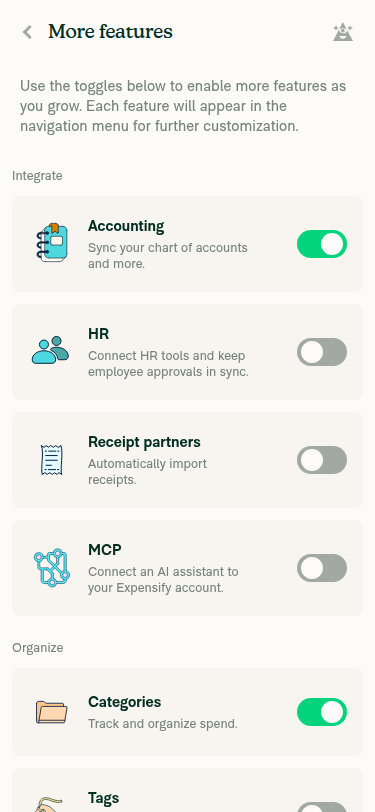
On native, the cards on Workspace > More features and Workspace > Accounting (Connections) stack one per row. Each card used flexBasis: '100%' to fill the row. Native Yoga caches a percentage flexBasis across rotations. After you rotate from portrait to landscape and reopen the page, the cards keep their portrait width, so two cards fit side by side.

This PR replaces styles.flexBasis100 with [styles.flexBasisAuto, styles.w100] in MoreFeatureToggle, ConnectionCard, and ExactOnlineWaitlistCard. A percentage width is recomputed on every layout. The onboarding tiles already use this approach for the same reason (see onboardingAccountingItemWide in src/styles/index.ts).

The wide (multi-column) layout is unchanged, because these styles only apply in the narrow/stacked layout.

AI tests run by MelvinBot: npm run typecheck, npm run lint-changed, npm run spell-changed, and react-compiler-compliance-check on the changed files all passed. The related Jest suites (WorkspaceMoreFeaturesPageTest, ExactOnlineConnectionListingTest, WorkspaceConnectionsPageAutoStartFlowTest) passed (48 tests). The rotation fix still needs manual verification on an Android device. MelvinBot's web session failed to load, so no UI check ran.

Fixed Issues

$ #105148
PROPOSAL: #105148 (comment)

Tests

// TODO: The human co-author must fill out the tests you ran before marking this PR as "ready for review"
// Please describe what tests you performed that validates your changed worked.

  • Verify that no errors appear in the JS console

Offline tests

QA Steps

Precondition: Set the device font size to the minimum. Enable the unifiedConnections beta. Use a workspace with Accounting enabled in More features.

Android: Native and iOS: Native (fix verification)

  1. In portrait, go to Workspace settings > Accounting (Connections).
  2. Verify the connection cards show one per row.
  3. Rotate the device to landscape and note the number of card columns.
  4. Tap the app back button, then reopen Accounting (Connections) while still in landscape.
  5. Verify the number of columns matches step 3.
  6. Rotate back to portrait and verify the cards show one per row again.
  7. Repeat steps 1-6 on Workspace settings > More features.

Web and mWeb (regression)

  1. On a wide window, go to Workspace settings > More features. Verify the cards show in a multi-column grid with no overlap or clipping.
  2. Go to Workspace settings > Accounting (Connections). Verify the connection cards show as before, with no overlap or clipping.
  3. Narrow the window to mobile width (or use mWeb). Verify both pages show one full-width card per row.
  4. Resize narrow > wide > narrow. Verify both pages switch layouts correctly each time.
  • Verify that no errors appear in the JS console

PR Author Checklist

  • I linked the correct issue in the ### Fixed Issues section above
  • I wrote clear testing steps that cover the changes made in this PR
    • I added steps for local testing in the Tests section
    • I added steps for the expected offline behavior in the Offline steps section
    • I added steps for Staging and/or Production testing in the QA steps section
    • I added steps to cover failure scenarios (i.e. verify an input displays the correct error message if the entered data is not correct)
    • I turned off my network connection and tested it while offline to ensure it matches the expected behavior (i.e. verify the default avatar icon is displayed if app is offline)
    • I tested this PR with a High Traffic account against the staging or production API to ensure there are no regressions (e.g. long loading states that impact usability).
  • I included screenshots or videos for tests on all platforms
  • I ran the tests on all platforms & verified they passed on:
    • Android: Native
    • Android: mWeb Chrome
    • iOS: Native
    • iOS: mWeb Safari
    • MacOS: Chrome / Safari
  • I verified there are no console errors (if there's a console error not related to the PR, report it or open an issue for it to be fixed)
  • I verified any copy / text that was added to the app is either coming verbatim from figma or has been approved by marketing (in order to get marketing approval, ask the Bug Zero team member to add the Waiting for copy label to the issue)
  • If a new code pattern is added I verified it was agreed to be used by multiple Expensify engineers
  • I tested other components that can be impacted by my changes (i.e. if the PR modifies a shared library or component like Avatar, I verified the components using Avatar are working as expected)
  • If new assets were added or existing ones were modified, I verified that:
    • The assets are optimized and compressed (for SVG files, run npm run compress-svg)
    • The assets load correctly across all supported platforms.
  • If the PR modifies code that runs when editing or sending messages, I tested and verified there is no unexpected behavior for all supported markdown - URLs, single line code, code blocks, quotes, headings, bold, strikethrough, and italic.
  • If the PR modifies a generic component, I tested and verified that those changes do not break usages of that component in the rest of the App (i.e. if a shared library or component like Avatar is modified, I verified that Avatar is working as expected in all cases)
  • If the PR modifies a component related to any of the existing Storybook stories, I tested and verified all stories for that component are still working as expected.
  • If the PR modifies a component or page that can be accessed by a direct deeplink, I verified that the code functions as expected when the deeplink is used - from a logged in and logged out account.
  • If the PR modifies the UI (e.g. new buttons, new UI components, changing the padding/spacing/sizing, moving components, etc) or modifies the form input styles:
    • I verified that all the inputs inside a form are aligned with each other.
    • I added Design label and/or tagged @Expensify/design so the design team can review the changes.
  • If the PR adds or modifies the UI:
    • I asked an AI agent to review the changes for accessibility issues and addressed its findings.
    • I tested with a screen reader (VoiceOver on macOS) and verified all new/changed elements are reachable with a logical focus order.
    • I verified all new/changed elements have meaningful accessible names and roles.
    • I verified state changes are announced (e.g. checked/unchecked, expanded/collapsed, selected).
  • I added unit tests for any new feature or bug fix in this PR to help automatically prevent regressions in this user flow.
  • If the main branch was merged into this PR after a review, I tested again and verified the outcome was still expected according to the Test steps.

Screenshots/Videos

Android: Native
Android: mWeb Chrome
iOS: Native
iOS: mWeb Safari
MacOS: Chrome / Safari

… so they stay one per row after rotation

Co-authored-by: Situ Chandra Shil <situchan@users.noreply.github.com>
@codecov

codecov Bot commented Oct 29, 2026 •

Copy link
Copy Markdown

Codecov Report

✅ Changes either increased or maintained existing code coverage, great job!

Files with missing lines Coverage Δ
...ce/WorkspaceMoreFeaturesPage/MoreFeatureToggle.tsx 100.00% <100.00%> (ø)
src/pages/workspace/connections/ConnectionCard.tsx 90.00% <100.00%> (ø)
.../workspace/connections/ExactOnlineWaitlistCard.tsx 100.00% <100.00%> (ø)
... and 11 files with indirect coverage changes

@MelvinBot

MelvinBot commented Oct 29, 2026 •

Copy link
Copy Markdown
Contributor Author

🤖 Android test steps verification results: ⚠️ partial

I could only verify the portrait baseline. My Android test session can't rotate the emulator, so I couldn't run the landscape steps this PR fixes. Nothing failed, but the fix is still unverified. The PR's Tests section is still a TODO, so I used the reproduction steps from the linked issue.
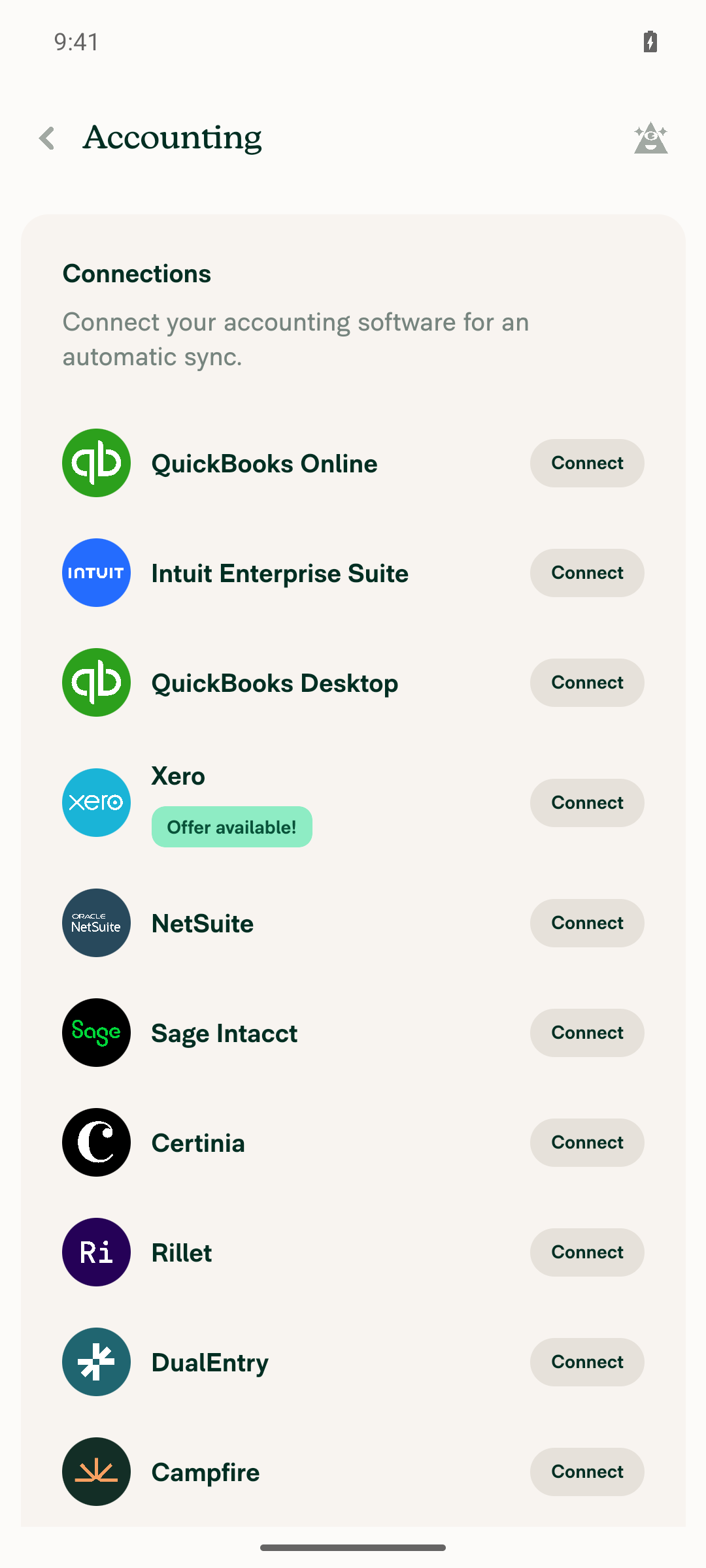
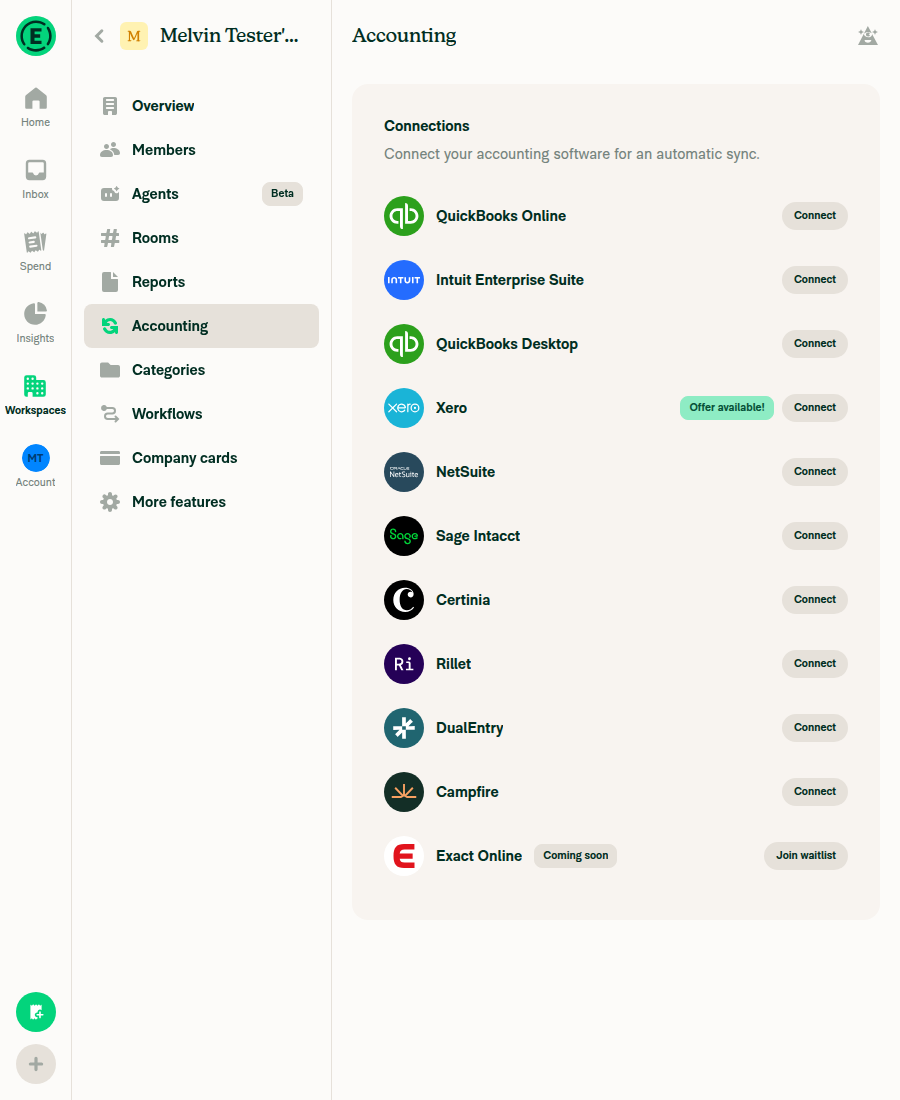
Accounting Connections page in portrait, one card per row

Step Status
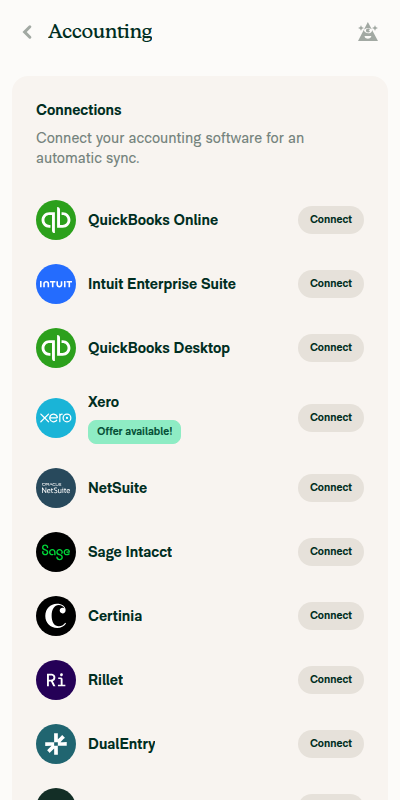
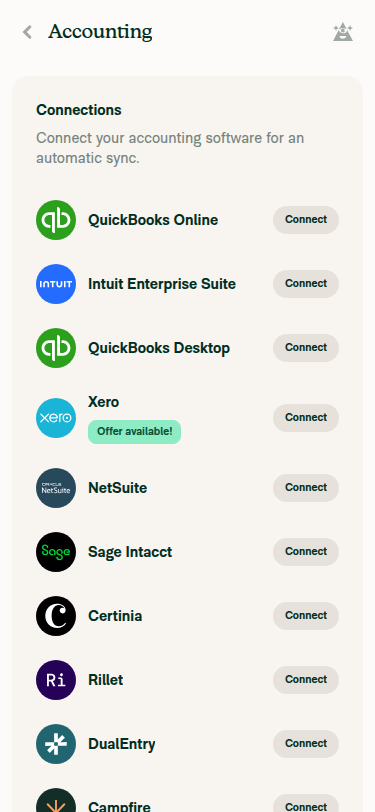
Portrait: Workspace > Accounting > Connections shows one card per rowQuickBooks Online, Intuit Enterprise Suite, QuickBooks Desktop, Xero, NetSuite, Sage Intacct, Certinia, Rillet, DualEntry, and Campfire each take a full-width row.
Accounting Connections page in portrait, one card per row
✅
Connections: column count after rotating to landscape matches the count after reopening in landscapeNot run. The test session blocks the device orientation command, and no other allowed command rotates the emulator.
⚠️
More features: column count after rotating to landscape matches the count after reopening in landscapeNot run. Same rotation block. More features opened normally in portrait.
⚠️
Rotating back to portrait returns one card per row on both pagesNot run. The device never left portrait.
⚠️

To verify the fix, run these steps on a real Android device or a local emulator that you can rotate.


view run · view recording

@MelvinBot

MelvinBot commented Oct 29, 2026 •

Copy link
Copy Markdown
Contributor Author

🤖 Web test steps verification results: ⚠️ partial

On web, More features and Accounting (Connections) look correct at wide and narrow widths, and they switch layouts correctly when you resize back and forth. I couldn't check the JS console because the web test tool can't read it, though nothing on screen showed an error. The PR's Tests section is still a TODO, so I tested the layout behavior the PR description covers.
Accounting after resizing wide to narrow again

Step Status
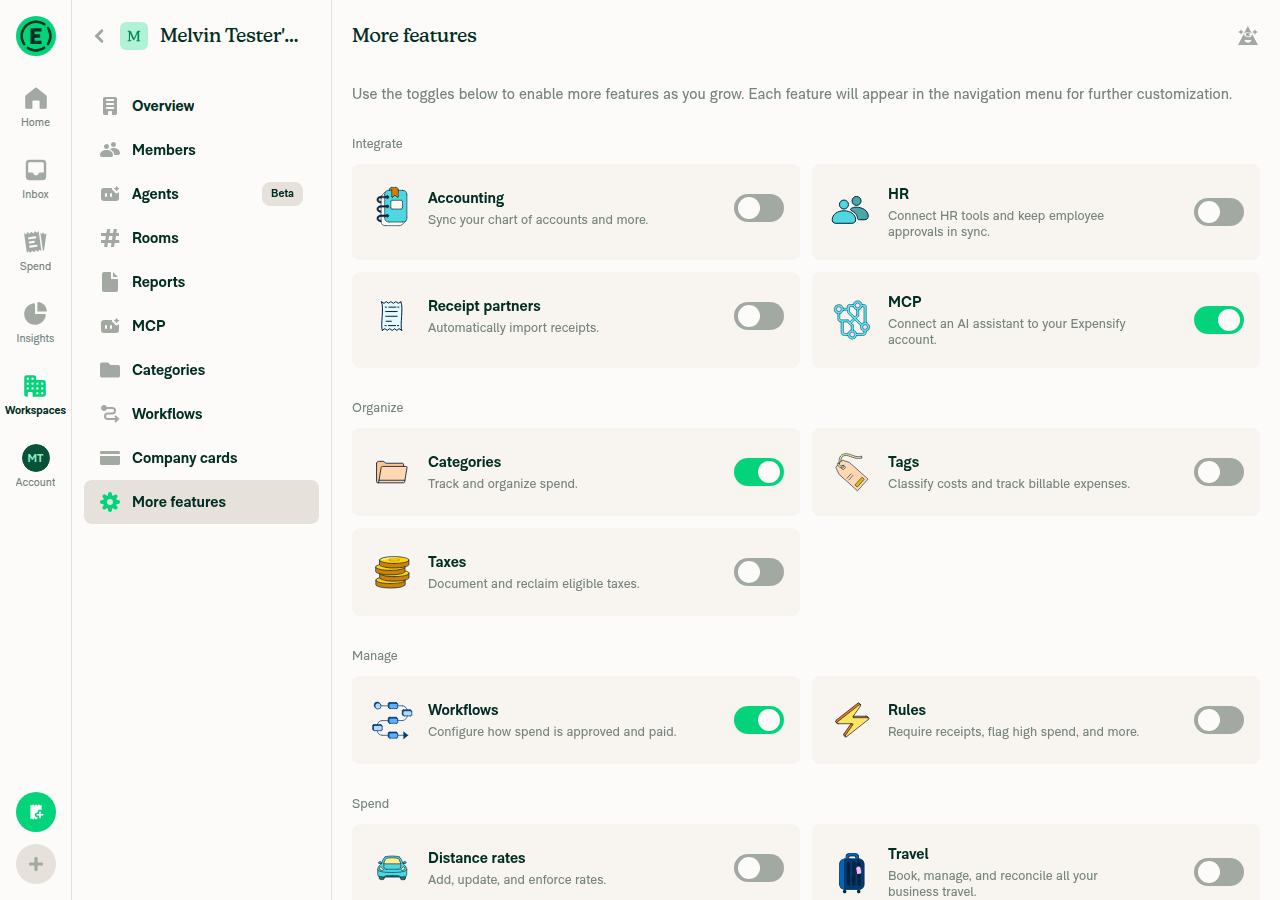
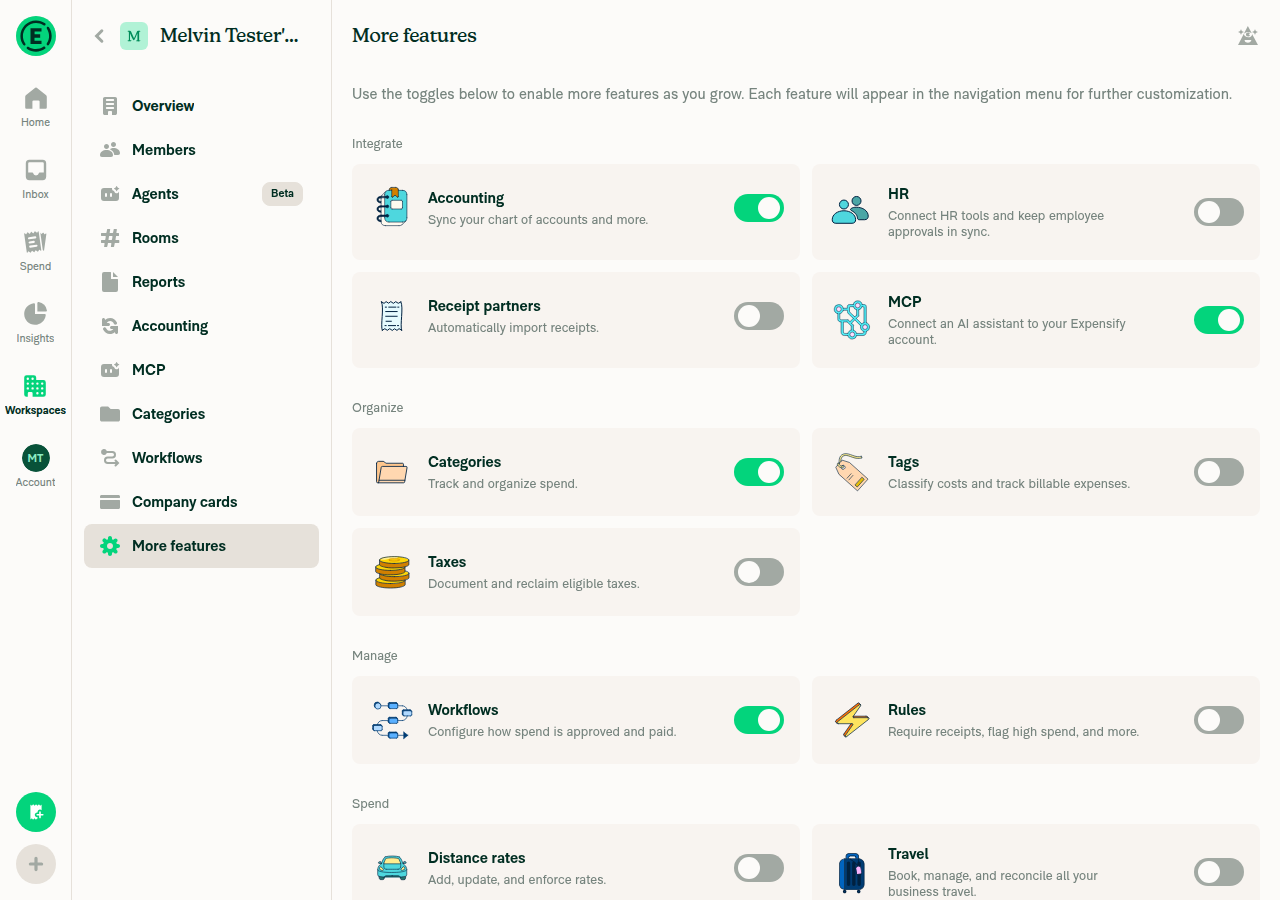
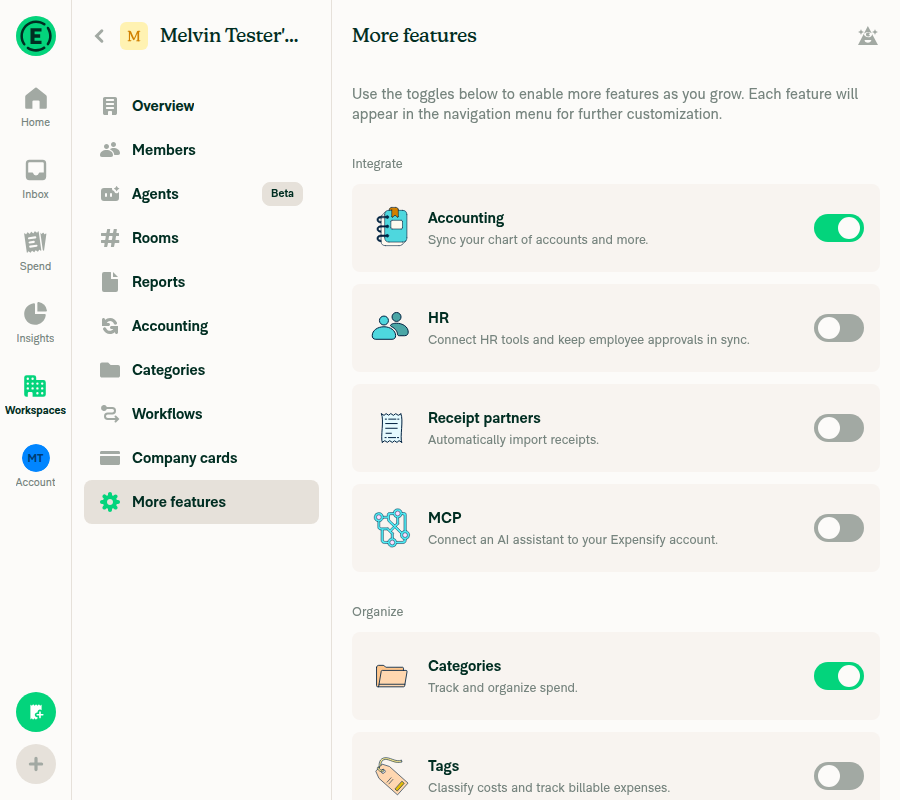
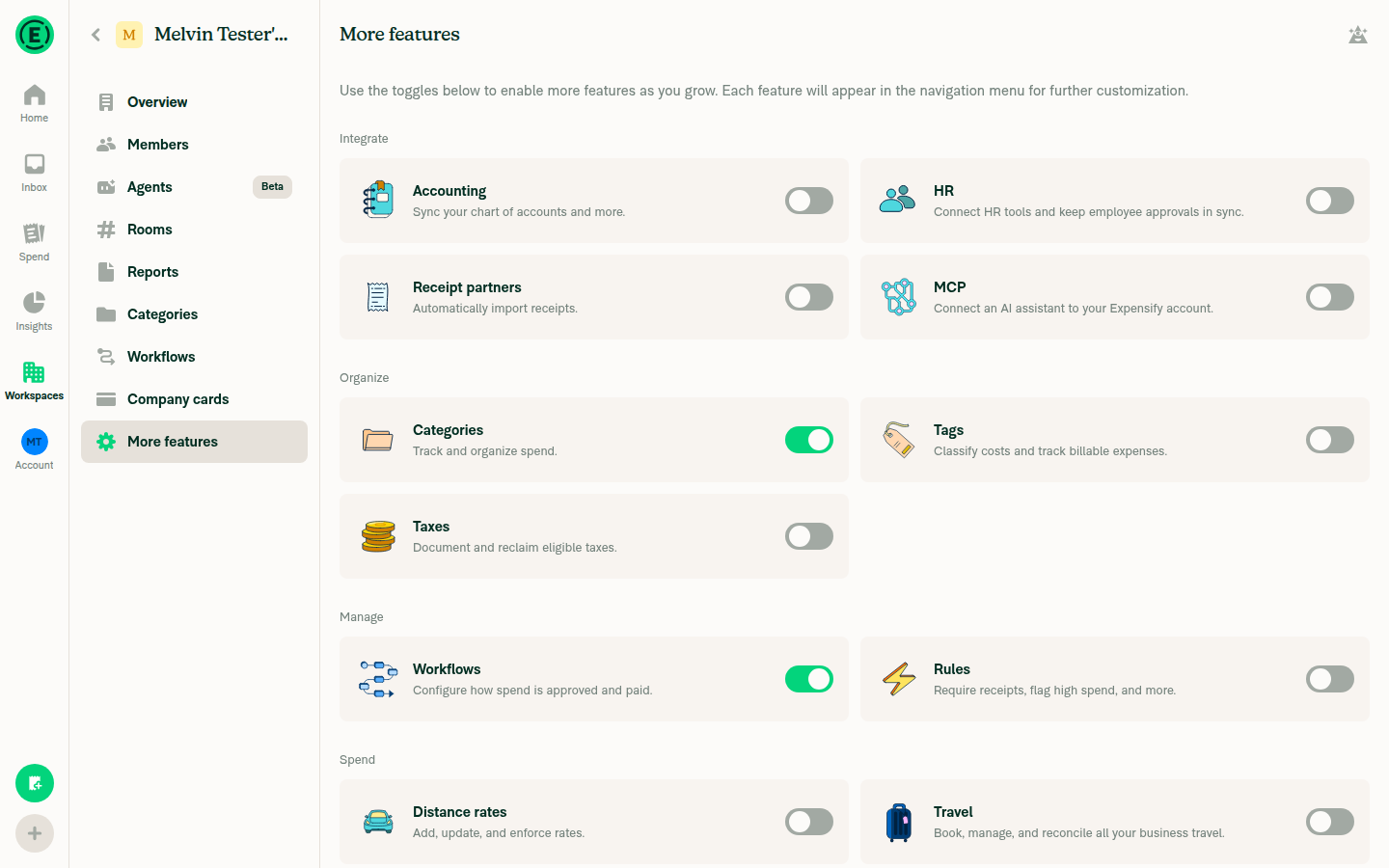
Wide viewport: More features shows cards in multiple columns, with no overlap or clippingAt 1280×900, More features shows a 2-column card grid with even spacing and no overlap.
Wide viewport More features, two-column card grid
✅
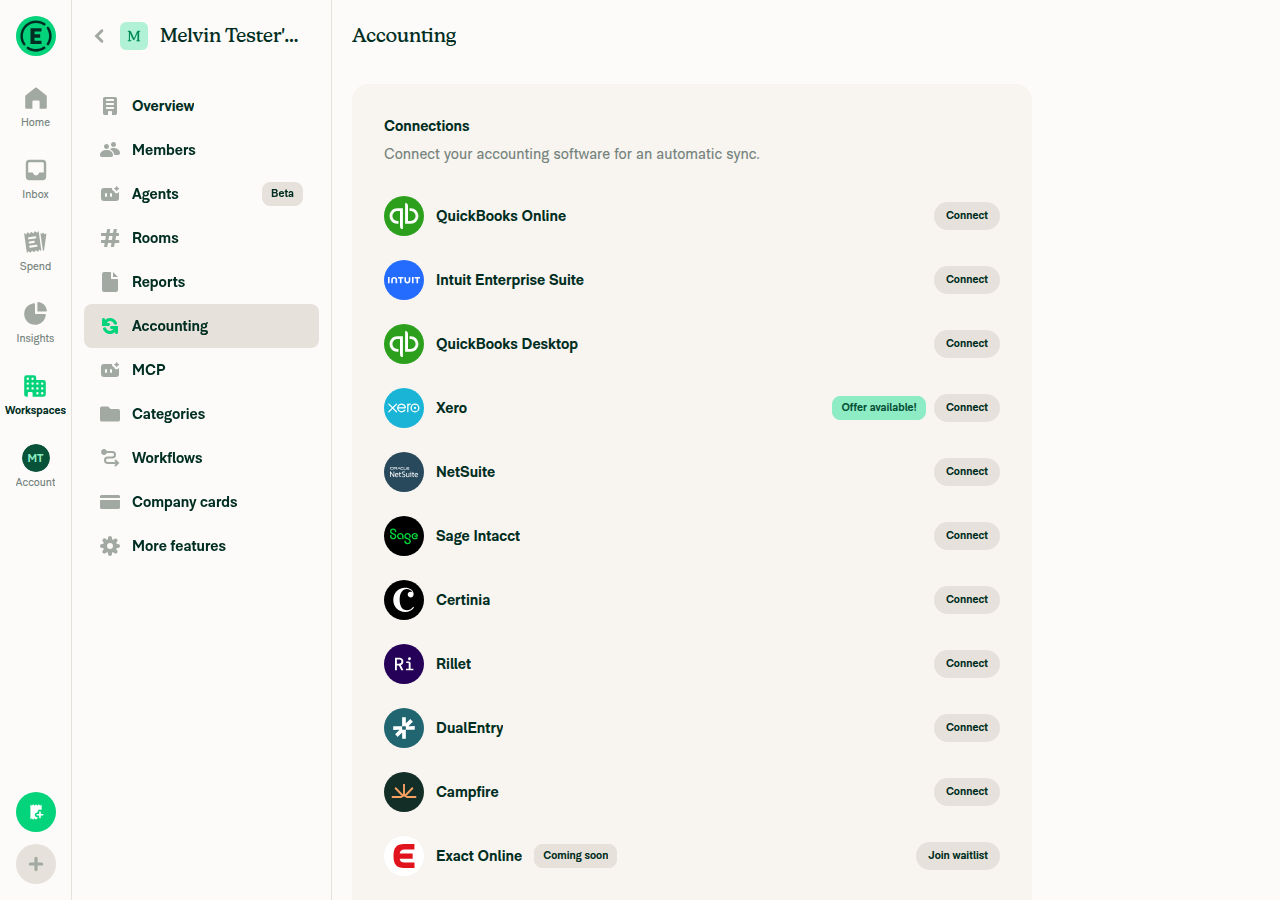
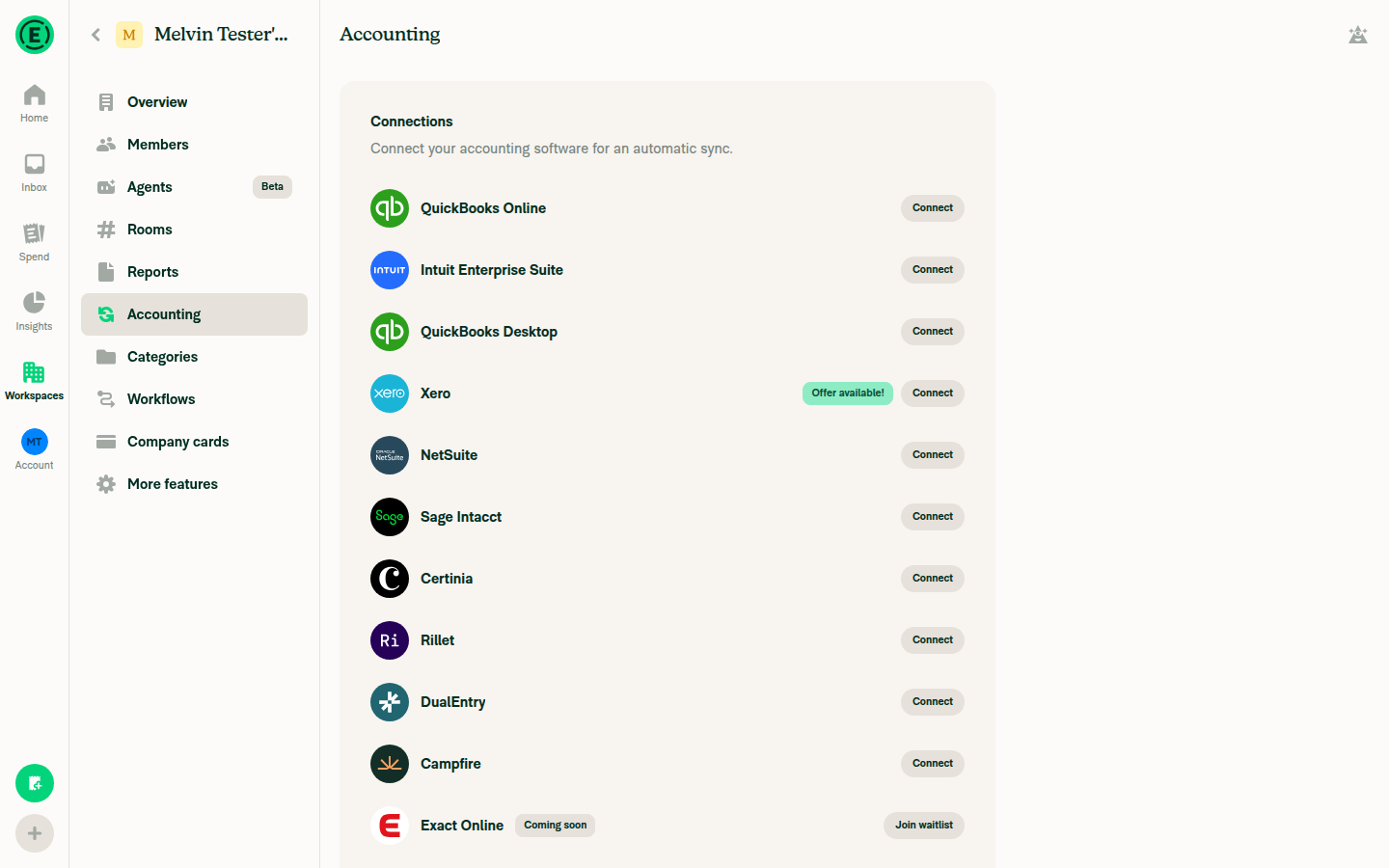
Wide viewport: Accounting (Connections) shows connection cards as before, with no overlap or clippingAt 1280×900, the Connections list (QuickBooks Online, Intuit Enterprise Suite, Xero, NetSuite, and others) shows one item per row, as this page is designed. Nothing overlaps or clips.
Wide viewport Accounting Connections list
✅
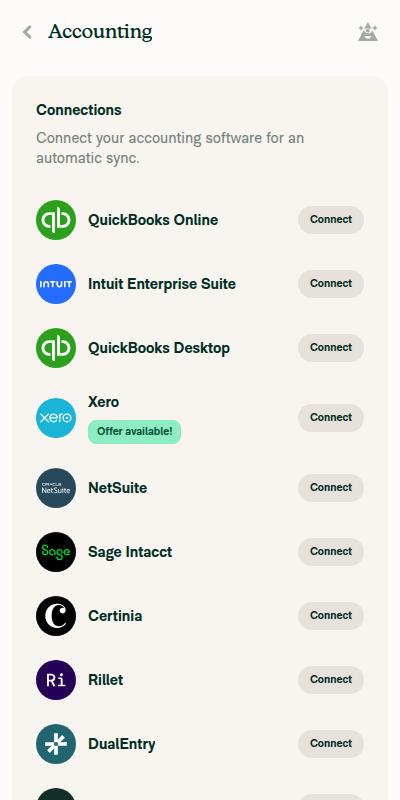
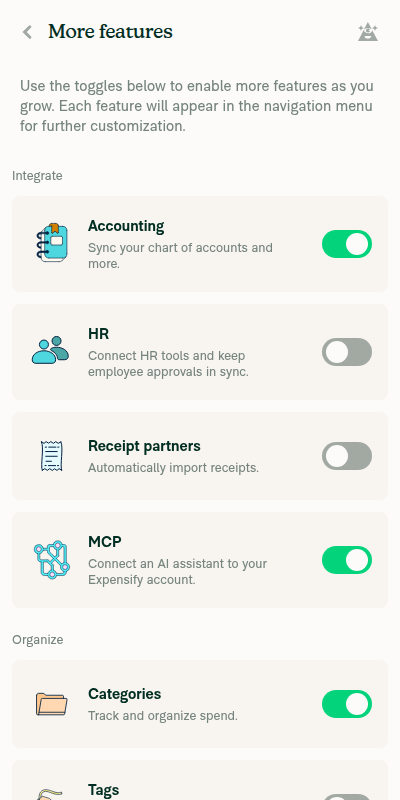
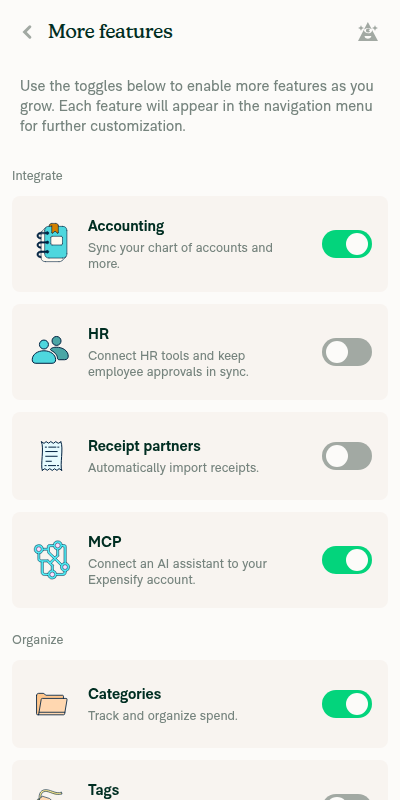
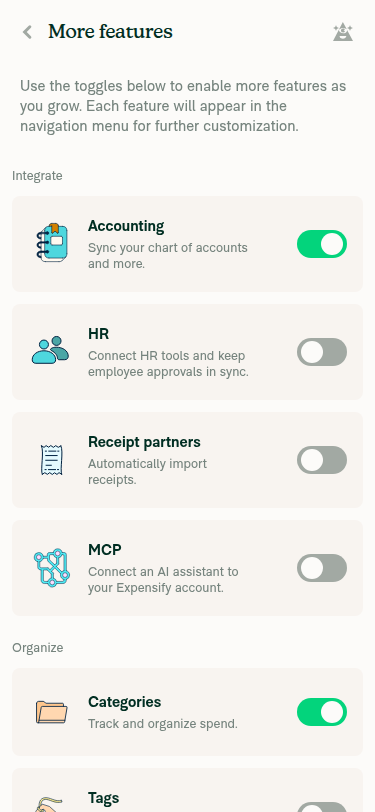
Narrow viewport (about 400px): More features shows one full-width card per rowAt 400×800, every feature card stacks one per row at full width, with no clipping.
Narrow viewport More features, one card per row
✅
Narrow viewport: Accounting (Connections) shows one full-width card per rowAt 400×800, every connection row is full width, one per row, with no overlap or clipping.
Narrow viewport Accounting Connections, one row per item
✅
Resizing narrow → wide → narrow switches the layout correctly on each pageMore features: one card per row at narrow, 2 columns at wide, then one per row again at narrow. Accounting: one per row at narrow, the same one-per-row list at wide, then one per row again at narrow.
More features after resizing narrow to wide
More features after resizing wide to narrow again
Accounting after resizing wide to narrow again
✅
No JS console errors appear during these stepsNot checked. The web test tool can't read the console. No error banners, broken UI, or crashes appeared on screen during the run.
⚠️

The rotation bug this PR fixes only happens in the native Android app, so this web run checks for regressions only. It doesn't test the fix itself.


view run · view recording

@situchan

Copy link
Copy Markdown
Contributor

@MelvinBot add QA Steps

@MelvinBot

Copy link
Copy Markdown
Contributor Author

I added QA Steps to the PR description.

  • Android and iOS native (fix check): Open Accounting (Connections) in portrait and rotate to landscape. Reopen the page while still in landscape, and confirm the column count is the same both times. Then repeat on More features. These steps use the linked issue's preconditions: minimum font size and the unifiedConnections beta.
  • Web and mWeb (regression check): Confirm both pages look right at wide and narrow widths, and while resizing between them.

I didn't run these steps for this update. My earlier Android run couldn't rotate the emulator, so the rotation fix still needs a manual check on a device.


view run

@situchan

Copy link
Copy Markdown
Contributor

@MelvinBot pull main

@MelvinBot

Copy link
Copy Markdown
Contributor Author

I merged the latest main into this branch. There were no conflicts.

  • The merge commit is 93fa142.
  • The branch was 531 commits behind main. It's now up to date.
  • The PR diff still covers only the same 3 files.

I didn't re-run tests after the merge. CI will run on the new commit.


view run

@situchan

Copy link
Copy Markdown
Contributor

@codex review

@situchan

Copy link
Copy Markdown
Contributor

@MelvinBot review

@chatgpt-codex-connector

chatgpt-codex-connector Bot commented Oct 29, 2026 •

Copy link
Copy Markdown

Codex Review Summary

This comment shows the latest Codex review activity on this pull request.

Review Status Commit Review trigger
📝 Code Review ✅ Completed 2026-10-29T19:49:24.217021Z 58cf6c5 Draft marked ready
ℹ️ About Codex in GitHub

Your team has set up Codex to review pull requests in this repo. Reviews are triggered when you

  • Open a pull request for review
  • Mark a draft as ready
  • Comment "@codex review" or "@codex security review".

Codex reacts with 👀 while any review is running, comments if it has suggestions, and reacts with 👍 once all reviews finish with no findings.

@MelvinBot

Copy link
Copy Markdown
Contributor Author

Review: code looks good, no blocking issues

The fix matches the root cause. Before merge, someone still needs to fill in the Tests section and add screenshots, including an Android rotation video.

Root cause confirmed in Yoga. React Native 0.86's Yoga computes an explicit flexBasis only once per node. It recomputes only if the WebFlexBasis experimental flag is on. A width is re-resolved on every layout. See CalculateLayout.cpp:107-119. So flexBasis: '100%' keeps the portrait width after rotation, and flexBasis: 'auto' with width: '100%' doesn't.

Layout should be unchanged:

  • getMinimumWidth(0) still overrides the 350px minWidth from workspaceSectionMoreFeaturesItem in all three cards. See MoreFeatureToggle.tsx:65, ConnectionCard.tsx:84, and ExactOnlineWaitlistCard.tsx:29.
  • On web, flex-basis: auto uses the 100% width, so the result is the same as before. The earlier web run confirmed this at wide and narrow widths.
  • The wide layout (connectionCard and the 35% basis) isn't touched.

Still needed before merge:

  1. Fill in the Tests section. It still has the TODO placeholder.
  2. Add screenshots for all platforms. Android native should show the rotate-then-reopen flow, since no automated run could rotate a device.
  3. Optional: remove the sentence in the description that says the web session failed to load. A later web run passed.

view run

@chatgpt-codex-connector

Copy link
Copy Markdown

Codex Review: Didn't find any major issues. Another round soon, please!

Reviewed commit: 93fa142206

ℹ️ About Codex in GitHub

Codex has been enabled to automatically review pull requests in this repo. Reviews are triggered when you

  • Open a pull request for review
  • Mark a draft as ready
  • Comment "@codex review".

If Codex has suggestions, it will comment; otherwise it will react with 👍.

When you sign up for Codex through ChatGPT, Codex can also answer questions or update the PR, like "@codex address that feedback".

@MelvinBot

Copy link
Copy Markdown
Contributor Author

The failing check is unrelated to this PR, so I didn't push a fix.

Analysis: validate-perf-tests failed on [ReportActionsList] should re-render when the report name changes. The render count differed by 0.6. That test is in tests/perf-test/ReportActionsListRowWrites.perf-test.tsx:185. This PR only changes card styles in three workspace files. None of them affect ReportActionsList. A render count can only differ by a fraction when it varies between runs, which points to a flaky measurement.

Evidence: The PR changes MoreFeatureToggle.tsx, ConnectionCard.tsx, and ExactOnlineWaitlistCard.tsx. The failure is in the report actions list perf test.

Next step: Rerun the full Reassure Performance Tests workflow. Rerunning only the failed job reuses the same measurements, so it won't help. Check independent approval will pass once someone approves the PR.

@MelvinBot

MelvinBot commented Oct 29, 2026 •

Copy link
Copy Markdown
Contributor Author

🤖 Web test steps verification results: ✅ pass

I found no layout regressions on More features or Accounting (Connections) at 375px, 900px, or 1440px. Cards stay full width with even margins, nothing clips or scrolls sideways, and toggling a feature switch leaves the layout unchanged.
Receipt partners toggled back off at 375px width

Step Status
Narrow (375px): More features cards are full width, one per row, with even margins, no clipping, and no sideways scrollAccounting, HR, Receipt partners, MCP, Categories, and the other cards each fill one row with even left and right margins. No edges clip and no scrollbar appears.
More features at 375px width
✅
Narrow (375px): Accounting (Connections) cards are full width, one per row, with even margins, no clipping, and no sideways scrollQuickBooks Online through Campfire each fill one row with even margins. Nothing clips or scrolls sideways.
Accounting Connections at 375px width
✅
Medium (900px): More features cards lay out cleanlyThe cards show in a single column with no overflow and no clipped text or edges.
More features at 900px width
✅
Medium (900px): Accounting (Connections) cards, including the Exact Online waitlist card, have the same width and no overflowAll cards, including the Exact Online "Join waitlist" card, have the same width. The Connect buttons line up on the right, and nothing overflows.
Accounting Connections at 900px width including Exact Online waitlist card
✅
Wide (1440px): both pages look normal, with no overflow or clippingMore features shows a 2-column grid, and Accounting shows its usual single-column list. Both have proper right margins. Right after the first page load, the right-column text on More features looked cut off at the window edge once. It didn't happen again after reloading, so it was likely a one-time render glitch.
More features at 1440px width
Accounting Connections at 1440px width
✅
Narrow (375px): toggling a More features switch on and back off keeps the card layout intactTurning Receipt partners on and off again left row heights, margins, and alignment pixel-identical. I couldn't check the hover highlight because the narrow layout has no hover state, but no row extended past its card.
Receipt partners toggled on at 375px width
Receipt partners toggled back off at 375px width
✅

I also reviewed the code for native regressions and found none. workspaceSectionMoreFeaturesItem has no side margins or border, and it keeps flexGrow/flexShrink. Each stacked card fills its own row in ConnectionsGrid.tsx:29-47, so width: 100% sizes the same as flexBasis: 100%. One area to check on a device: the wide layout still uses a percentage flexBasis, so rotate a tablet between portrait and landscape on both pages.


view run · no recording available

@situchan

Copy link
Copy Markdown
Contributor

@MelvinBot pull main

@MelvinBot

Copy link
Copy Markdown
Contributor Author

I merged the latest main into this branch with a merge commit (86ab3a7). The branch is now up to date with main and has no conflicts. Existing commits weren't changed.


view run

@MelvinBot

Copy link
Copy Markdown
Contributor Author

The failing Reassure Performance Tests check is unrelated to this PR, so I didn't push a fix. The other failing check, Check independent approval, passes once a reviewer approves the PR.

Analysis: The validate-perf-tests job fails on render counts in the [ReportActionsList] perf tests. This PR only changes workspace "More features" and accounting connection cards. None of those components appear in any perf test.

Evidence
  • Failure location: tests/perf-test/ReportActionsList.perf-test.tsx. For example, should re-render when an unrelated transaction is written changed from 27 → 27.70 average renders.
  • PR files: MoreFeatureToggle.tsx, ConnectionCard.tsx, and ExactOnlineWaitlistCard.tsx. None of them appear in tests/perf-test/.
  • Noise: The render counts are fractional averages that move in both directions between runs. On the last commit, report name changes was +0.60. After merging main, it was +0.10, while unrelated transaction is written jumped to +0.70. Other tests in the same run dropped by 0.10. Stability also went up to 16–30%, which points to runner noise rather than a real regression.
  • Runs: before merging main and after merging main. Jest unit tests pass on the current head.

To clear it, re-run the failed Reassure Performance Tests job.


view run

@situchan

Copy link
Copy Markdown
Contributor

@MelvinBot pull main

@MelvinBot

Copy link
Copy Markdown
Contributor Author

The failing check is unrelated to this PR, so I didn't push a code change.

Analysis: validate-perf-tests failed on two ReportActionsList Reassure tests. This PR only changes workspace card components, and ReportActionsList doesn't import any of them. The failures look flaky:

  • Each run failed a different test. The first run failed "re-render when the report name changes" (difference 0.6). The latest run failed "re-render when an unrelated transaction is written" (difference 0.7).
  • A fractional difference means the render count changed between repeated runs of the same code.
  • The same 0.6 failure on "re-render when the report name changes" also hit an unrelated PR branch today (dariusz-biela/fix/dynamic-form-spacing).

Evidence: The PR changes MoreFeatureToggle.tsx, ConnectionCard.tsx, and ExactOnlineWaitlistCard.tsx in src/pages/workspace/. The failing tests are in tests/perf-test/ReportActionsListRowWrites.perf-test.tsx:179-190.

Next step: Rerun the failed jobs in the Reassure Performance Tests run. Check independent approval will pass once a reviewer approves the PR.

…rdFlexBasis

Co-authored-by: Situ Chandra Shil <situchan@users.noreply.github.com>
@MelvinBot

Copy link
Copy Markdown
Contributor Author

I merged main into this branch and pushed it (58cf6c5). The branch was 11 commits behind, and it's up to date now.

The merge had no conflicts. None of the new commits from main touch the files this PR changes, so I didn't re-run tests.


view run

@MelvinBot

Copy link
Copy Markdown
Contributor Author

The failing checks are unrelated to this PR, so I didn't push a fix.

  • Reassure Performance Tests: The failing measurements are both in ReportActionsList. This PR changes only three workspace card components (MoreFeatureToggle, ConnectionCard, ExactOnlineWaitlistCard), and ReportActionsList doesn't import any of them.
  • Check independent approval: This check passes once a reviewer approves the PR.

A new Reassure run on the latest commit is still in progress. If it fails again on ReportActionsList, please re-run it.

Evidence
  • Run 40928023645: [ReportActionsList] should re-render when the report name changes. The render count was off by 0.6, and the allowed difference is 0.
  • Run 40936011518: [ReportActionsList] should re-render when an unrelated transaction is written. The render count was off by 0.7.
  • A different test failed on each run, and both differences are fractional averages. That pattern points to flaky tests rather than a real regression.
  • In the last few hours, Reassure has also failed on at least 10 other branches, including dariusz-biela/fix/dynamic-form-spacing and war-in/resizable-spend-tables.
  • Jest unit tests passed on the earlier commit and are running again on the latest one.

view run

@MelvinBot

Copy link
Copy Markdown
Contributor Author

The failing check is unrelated to this PR, so I didn't push a fix. A rerun of validate-perf-tests should pass.

Analysis: The Reassure perf run failed on [ReportActionsList] should re-render when an unrelated transaction is written (tests/perf-test/ReportActionsListRowWrites.perf-test.tsx). The render count differed by 0.8, and the allowed deviation is 0.

Evidence:

  • This PR only changes MoreFeatureToggle.tsx, ConnectionCard.tsx, and ExactOnlineWaitlistCard.tsx. Only workspace pages import them, and ReportActionsList does not.
  • Other PRs fail the same [ReportActionsList] tests today with similar fractional deviations (0.6–0.7). Examples include dariusz-biela/fix/dynamic-form-spacing and claude-defaultWorkspaceCurrencyGlobalCreate.

The other failing check, Check independent approval, passes once the PR is approved.


view run

@situchan

Copy link
Copy Markdown
Contributor

@MelvinBot mark this PR ready for review

@situchan

Copy link
Copy Markdown
Contributor

Reviewer Checklist

  • I have verified the author checklist is complete (all boxes are checked off).
  • I verified the correct issue is linked in the ### Fixed Issues section above
  • I verified testing steps are clear and they cover the changes made in this PR
    • I verified the steps for local testing are in the Tests section
    • I verified the steps for Staging and/or Production testing are in the QA steps section
    • I verified the steps cover any possible failure scenarios (i.e. verify an input displays the correct error message if the entered data is not correct)
    • I turned off my network connection and tested it while offline to ensure it matches the expected behavior (i.e. verify the default avatar icon is displayed if app is offline)
  • I checked that screenshots or videos are included for tests on all platforms
  • I included screenshots or videos for tests on all platforms
  • I verified that the composer does not automatically focus or open the keyboard on mobile unless explicitly intended. This includes checking that returning the app from the background does not unexpectedly open the keyboard.
  • I verified tests pass on all platforms & I tested again on:
    • Android: HybridApp
    • Android: mWeb Chrome
    • iOS: HybridApp
    • iOS: mWeb Safari
    • MacOS: Chrome / Safari
  • If there are any errors in the console that are unrelated to this PR, I either fixed them (preferred) or linked to where I reported them in Slack
  • I verified any copy / text that was added to the app is either coming verbatim from figma or has been approved by marketing (in order to get marketing approval, ask the Bug Zero team member to add the Waiting for copy label to the issue)
  • If a new code pattern is added I verified it was agreed to be used by multiple Expensify engineers
  • I verified other components that can be impacted by these changes have been tested, and I retested again (i.e. if the PR modifies a shared library or component like Avatar, I verified the components using Avatar have been tested & I retested again)
  • If a new component is created I verified that:
    • A similar component doesn't exist in the codebase
    • All props are defined accurately
    • The component has a clear name that is non-ambiguous and the purpose of the component can be inferred from the name alone
    • The only data being stored in the state is data necessary for rendering and nothing else
    • The component has the minimum amount of code necessary for its purpose, and it is broken down into smaller components in order to separate concerns and functions
  • If the PR modifies code that runs when editing or sending messages, I tested and verified there is no unexpected behavior for all supported markdown - URLs, single line code, code blocks, quotes, headings, bold, strikethrough, and italic.
  • If the PR modifies a generic component, I tested and verified that those changes do not break usages of that component in the rest of the App (i.e. if a shared library or component like Avatar is modified, I verified that Avatar is working as expected in all cases)
  • If the PR modifies a component related to any of the existing Storybook stories, I tested and verified all stories for that component are still working as expected.
  • If the PR modifies a component or page that can be accessed by a direct deeplink, I verified that the code functions as expected when the deeplink is used - from a logged in and logged out account.
  • If the PR modifies the UI (e.g. new buttons, new UI components, changing the padding/spacing/sizing, moving components, etc) or modifies the form input styles:
    • I verified that all the inputs inside a form are aligned with each other.
    • I added Design label and/or tagged @Expensify/design so the design team can review the changes.
  • If the PR adds or modifies the UI:
    • I asked an AI agent to review the changes for accessibility issues and addressed its findings.
    • I tested with a screen reader (VoiceOver on macOS) and verified all new/changed elements are reachable with a logical focus order.
    • I verified all new/changed elements have meaningful accessible names and roles.
    • I verified state changes are announced (e.g. checked/unchecked, expanded/collapsed, selected).
  • For any bug fix or new feature in this PR, I verified that sufficient unit tests are included to prevent regressions in this flow.
  • If the main branch was merged into this PR after a review, I tested again and verified the outcome was still expected according to the Test steps.
  • I have checked off every checkbox in the PR reviewer checklist, including those that don't apply to this PR.

Screenshots/Videos

Android: HybridApp
android.mov
Android: mWeb Chrome
iOS: HybridApp
ios.mp4
iOS: mWeb Safari
MacOS: Chrome / Safari
web.mov

@situchan

Copy link
Copy Markdown
Contributor

Failing perf test is unrelated. This seems frequently happening on other PRs as well.

@MelvinBot
MelvinBot marked this pull request as ready for review October 29, 2026 19:45
@MelvinBot
MelvinBot requested a review from a team as a code owner October 29, 2026 19:45
@MelvinBot

Copy link
Copy Markdown
Contributor Author

I marked this PR as ready for review.


view run

@melvin-bot
melvin-bot Bot requested review from Krishna2323 and situchan and removed request for a team October 29, 2026 19:45
@melvin-bot

melvin-bot Bot commented Oct 29, 2026

Copy link
Copy Markdown

@Krishna2323 @situchan One of you needs to copy/paste the Reviewer Checklist from here into a new comment on this PR and complete it. If you have the K2 extension, you can simply click: [this button]

@melvin-bot
melvin-bot Bot requested review from heyjennahay and removed request for a team October 29, 2026 19:46
@melvin-bot
melvin-bot Bot requested a review from lakchote October 29, 2026 19:46
@MelvinBot

Copy link
Copy Markdown
Contributor Author

The failing check is unrelated to this PR, so I didn't push a fix.

Analysis: validate-perf-tests (Reassure) fails on render counts in ReportActionsList perf tests. This PR only changes workspace card layout, so it doesn't touch that code. The failure looks flaky. Each run fails on a different measurement, by a fractional render count (0.6 to 0.8):

  • Run 1: should re-render when the report name changes (0.6)
  • Runs 2 and 3: should re-render when an unrelated transaction is written (0.7, then 0.8)

The same report name changes failure also happened today on an unrelated PR, fix(DynamicForm): Give every input the same spacing as its neighbors.

Evidence: This PR changes MoreFeatureToggle.tsx, ConnectionCard.tsx, and ExactOnlineWaitlistCard.tsx. The failing tests are in tests/perf-test/ReportActionsListRowWrites.perf-test.tsx:179-185.

The only other failure is Check independent approval. It clears once a reviewer approves the PR. You can re-run the Reassure job, or merge with it failing.


view run

This branch has not been deployed

No deployments
Sign up for free to join this conversation on GitHub. Already have an account? Sign in to comment

Labels

Melvin-Test-Android Melvin-Test-Web Triggers Melvin to run the testing steps of the PR on web

Projects

None yet

Development

Successfully merging this pull request may close these issues.

2 participants